Dashboards 查询语言(DQL)
Dashboards 查询语言(DQL)是一种用于在 UDB-SX Dashboards 中过滤数据的简单文本查询语言。
DQL 与查询字符串查询(Lucene)是 发现 和 控制面板 中搜索栏的两种语言选项。本页提供 DQL 语法参考。
默认情况下,UDB-SX Dashboards 使用 DQL 语法。要切换到 查询字符串查询(Lucene),在搜索框旁选择 DQL 按钮,然后切换 “开” 开关,如下图所示。
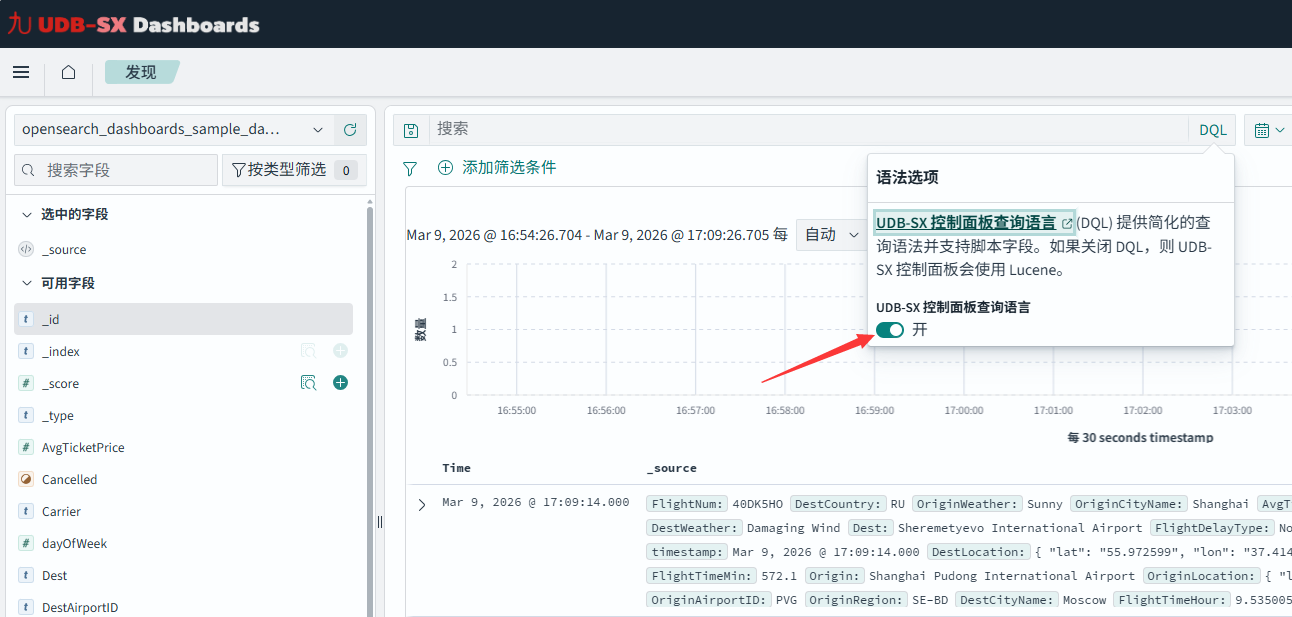
对已分析文本的查询
在运行查询时,了解字段是已分析(text 类型)还是未分析(keyword 类型)非常重要,因为这会显著影响搜索行为。在已分析字段中,文本会被分词和过滤;而未分析字段按完整值存储。对于像 wind 这样的简单字段查询,在已分析字段上会匹配包含 wind(不区分大小写)的文档,而在 keyword 字段上则需要完全匹配完整字符串。
设置
要在 UDB-SX Dashboards 中跟随本教程操作,请参考以下设置步骤。
使用以下步骤准备示例数据以便查询。
步骤 1:为索引设置映射
在主菜单中选择 管理 > 开发工具 打开 开发工具控制台。发送以下请求以创建索引映射:
PUT testindex
{
  "mappings" : {
    "properties" :  {
      "date" : {
        "type" : "date",
        "format" : "yyyy-MM-dd"
      }
    }
  }
}
步骤 2:将文档写入索引
在 Dev Tools 中,将以下文档写入索引:
PUT /testindex/_doc/1
{
  "title": "The wind rises",
  "description": "A biographical film",
  "media_type": "film",
  "date": "2013-07-20",
  "page_views": 100
}
PUT /testindex/_doc/2
{
  "title": "Gone with the wind",
  "description": "A well-known 1939 American epic historical film",
  "media_type": "film",
  "date": "1939-09-09",
  "page_views": 200
}
PUT /testindex/_doc/3
{
  "title": "Chicago: the historical windy city",
  "media_type": "article",
  "date": "2023-07-29",
  "page_views": 300
}
PUT /testindex/_doc/4
{
  "article title": "Wind turbines",
  "media_type": "article",
  "format": "2*3"
}
步骤 3:创建索引模式
按以下步骤为索引创建索引模式:
在主菜单中选择 管理 > 控制面板管理。
选择 索引模式 然后选择 创建所以模式。
在 索引模式名称 中输入
testindex*,然后选择 下一步。在 时间字段 中选择
我不想用时间过滤器。选择 创建索引模式。
有关索引模式的更多信息,请参阅 Index patterns。
步骤 4:导航到 Discover 并选择索引模式
在主菜单中选择 Discover。在左上角的索引模式下拉中选择 testindex*。主面板将显示索引中的文档,你现在可以尝试本页描述的 DQL 查询。
DQL 与 query string query 快速参考
下表为两种查询语言提供快速对照。
| 功能 | DQL | Query string query(Lucene) |
|---|---|---|
| 基本词项搜索 | wind |
wind |
| 多个词 | wind gone(匹配包含 wind 或 gone 的文档) |
wind gone(匹配包含 wind 或 gone 的文档) |
| 精确短语搜索 | "wind rises" |
"wind rises" |
| 指定字段搜索 | title: wind |
title:wind |
| 字段存在性 | description:* |
_exists_:description |
| 字段内多个词 | title: (wind OR rises) |
title:(wind OR rises) |
| 含空格字段 | article*title: wind |
article\ title:wind |
| 转义特殊字符 | format: 2\*3 |
format:2\*3 |
| 多字段搜索 | title: wind OR description: film |
title:wind OR description:film |
| 嵌套字段搜索 | 见 Nested fields | 不支持 |
| 数值范围 | page_views >= 100 and page_views <= 300 not page_views: 100(结果包括不含 page_views 字段的文档) 见 Ranges |
page_views:[100 TO 300] page_views:(>=100 AND <=300) page_views:(+>=100 +<=300) page_views:[100 TO *] page_views:>=100 NOT page_views:100(结果包括不含 page_views 字段的文档) |
| 日期范围 | date >= "1939-01-01" and date <= "2013-12-31" not date: "1939-09-08" |
date:[1939-01-01 TO 2013-12-31] NOT date:1939-09-08 |
| 排他区间 | 不支持 | page_views:{100 TO 300}(排除端点) |
布尔 AND |
media_type:film AND page_views:100 media_type:film and page_views:100 |
media_type:film AND page_views:100 +media_type:film +page_views:100 |
布尔 NOT |
NOT media_type: article not media_type: article |
NOT media_type:article -media_type:article |
布尔 OR |
title: wind OR description: film title: wind or description: film |
title: wind OR description: film |
| 必需/禁止操作符 | 不支持 | 支持 +(必需) 和 -(禁止) |
| 通配符 | title: wind* titl*: wind 不支持短语内通配符,仅支持 *(多字符) |
title:wind* 或 title:w?nd 支持 * 和 ? |
| 正则表达式 | 不支持 | title:/w[a-z]nd/ |
| 模糊搜索 | 不支持 | title:wind~2 |
| 邻近搜索 | 不支持 | "wind rises"~2 |
| 提升 (boost) | 不支持 | title:wind^2 |
| 保留字符 | \ ( ) : < > " * |
+ - = && || > < ! ( ) { } [ ] ^ " ~ * ? : \ / |
词项搜索
默认情况下,DQL 在索引设置为默认字段的字段上搜索。如果未设置默认字段,DQL 将搜索所有字段。例如,以下查询在任何字段中查找包含 rises 或 wind 的文档:
rises wind
该查询匹配任何包含任一搜索词的文档(词序不限)。默认情况下,DQL 使用 or 将搜索词连接。有关如何构造包含布尔表达式的查询,请参阅 布尔运算符。
要搜索短语(按顺序的一系列词),请使用引号将文本括起来。例如,以下查询搜索精确文本 “wind rises”:
"wind rises"
连字符在 Lucene 中为保留字符,因此如果搜索词含连字符,DQL 可能会提示你切换到 Lucene 语法。为避免此问题,在短语搜索时用引号括起包含连字符的词,或在普通搜索中省略连字符即可。
保留字符
DQL 中的保留字符如下:
\, (, ), :, <, >, ", *
使用反斜杠 \ 对保留字符进行转义。例如,要搜索表达式 2*3,请写成 2\*3:
2\*3
在字段中搜索
要在特定字段中搜索文本,请在冒号前指定字段名:
title: rises wind
字段的分析器会将查询文本分词,并匹配包含任一分词的文档。
DQL 忽略空格字符,因此 title:rises wind 与 title: rises wind 等价。
字段名包含空格时,可使用通配符引用字段名。例如,article*title 可匹配 article title 字段。
字段名示例
在下表中列出一些字段查询示例及其匹配规则。
| Query | 文档匹配条件 | 匹配到的 testindex 文档 |
|---|---|---|
title: wind |
title 字段包含单词 wind。 |
1, 2 |
title: (wind OR windy) |
title 字段包含 wind 或 windy。 |
1, 2, 3 |
title: "wind rises" |
title 字段包含短语 wind rises。 |
1 |
title.keyword: The wind rises |
title.keyword 字段精确匹配 The wind rises。 |
1 |
title*: wind |
任何以 title 开头的字段(例如 title 和 title.keyword)包含 wind。 |
1, 2 |
article*title: wind |
开头为 article 并以 title 结尾的字段包含 wind(匹配 article title)。 |
4 |
description:* |
文档存在 description 字段。 |
1, 2 |
通配符
DQL 支持通配符(仅 *)用于搜索词和字段名,例如:
t*le: *wind and rise*
范围查询
DQL 支持使用 >, <, >=, <= 运算符进行数值不等式查询,例如:
page_views > 100 and page_views <= 300
可对日期使用范围运算符。例如,以下查询在 2013–2023 年范围内(包含端点)搜索:
date >= "2013-01-01" and date < "2024-01-01"
要查询“不等于”,可使用 not 和字段名,例如:
not page_views: 100
注意,上述查询返回的文档要么 page_views 字段不为 100,要么根本没有该字段。若只想筛选包含该字段但其值不为 100 的文档,请使用:
page_views:* and not page_views: 100
布尔运算符
DQL 支持 and、or、not 布尔运算符。DQL 不区分大小写,因此 AND 与 and 等价。例如,以下查询是两个布尔子句的合取:
title: wind and description: epic
布尔运算的优先级为 not、and、or,因此在下面示例中,title: wind and description: epic 会先被计算:
media_type: article or title: wind and description: epic
如需改变计算顺序,请使用括号将子表达式分组。例如,以下查询先计算括号内表达式:
(media_type: article or title: wind) and description: epic
字段前缀仅作用于紧随其后的词元。例如,下面的查询表示 title 字段包含 windy,或者任意字段包含 historical:
title: windy or historical
若要查找 title 字段包含 windy 或 historical 的文档,应将项放入括号中:
title: (windy or historical)
上式相当于 title: windy or title: historical。
要否定某个查询,使用 not 运算符。例如,下面的查询查找 title 字段包含 wind、但 media_type 不是 article,且 description 不包含 epic 的文档:
title: wind and not (media_type: article or description: epic)
查询可以包含多层分组,例如:
title: ((wind or windy) and not rises)
对象字段
要引用对象的内部字段,使用点路径(dot path)。
若要索引包含对象的文档,请参阅 对象字段类型示例。要搜索 patient 对象的 name 字段,语法如下:
patient.name: john
嵌套字段
要引用嵌套对象,列出 JSON 路径即可。
若要索引包含嵌套字段的文档,请参阅 嵌套字段示例。
要搜索 patients 对象的 name 字段,语法如下:
patients: {name: john}
若要检索匹配多个字段的文档,请指定所有字段。比如,假设文档还包含 status 字段,示例如下:
{
  "status": "Discharged",
  "patients": [
    {"name" : "John Doe", "age" : 56, "smoker" : true},
    {"name" : "Mary Major", "age" : 85, "smoker" : false}
  ]
}
要搜索出既为 discharged 且患者姓名为 John 的记录,可写:
patients: {name: john} and status: discharged
你也可以组合多个布尔或范围查询以构建更精细的检索,例如:
patients: {name: john and smoker: true and age < 57}
双重嵌套字段
考虑一个双重嵌套字段的文档,其中 patients 与 names 均为 nested 类型:
{
  "patients": [
    {
      "names": [
        { "name": "John Doe", "age": 56, "smoker": true },
        { "name": "Mary Major", "age": 85, "smoker": false}
      ]
    }
  ]
}
要搜索 patients 对象下 names 的 name 字段,语法为:
patients: {names: {name: john}}
对比另一种结构:patients 为 object 类型,而 names 为 nested 类型时:
{
  "patients":
  {
    "names": [
      { "name": "John Doe", "age": 56, "smoker": true },
      { "name": "Mary Major", "age": 85, "smoker": false}
    ]
  }
}
此时要搜索 patients 对象下 names 的 name 字段,应使用:
patients.names: {name: john}