向量搜索入门指南
本指南将向您展示如何在 UDB-SX 中使用自定义向量。您将学习如何创建向量索引、添加位置数据,并执行向量搜索,以在坐标平面上查找最近的酒店。虽然为了简化,本例使用的是二维向量,但同样的方法也适用于语义搜索和推荐系统中使用的高维向量。
步骤 1:创建向量索引
首先,创建一个用于存储示例酒店数据的索引。为了告知 UDB-SX 这是一个向量索引,请将 index.knn 设置为 true。您将把向量存储在一个名为 location 的向量字段中。将要摄入的向量是二维的,向量之间的距离将使用欧几里得 L2 相似性度量来计算:
PUT /hotels-index
{
  "settings": {
    "index.knn": true
  },
  "mappings": {
    "properties": {
      "location": {
        "type": "knn_vector",
        "dimension": 2,
        "space_type": "l2"
      }
    }
  }
}
步骤 2:向索引添加数据
接下来,向您的索引添加数据。每个文档代表一家酒店。每个文档中的 location 字段包含一个指定酒店位置的二维向量:
POST /_bulk
{ "index": { "_index": "hotels-index", "_id": "1" } }
{ "location": [5.2, 4.4] }
{ "index": { "_index": "hotels-index", "_id": "2" } }
{ "location": [5.2, 3.9] }
{ "index": { "_index": "hotels-index", "_id": "3" } }
{ "location": [4.9, 3.4] }
{ "index": { "_index": "hotels-index", "_id": "4" } }
{ "location": [4.2, 4.6] }
{ "index": { "_index": "hotels-index", "_id": "5" } }
{ "location": [3.3, 4.5] }
步骤 3:搜索数据
现在搜索距离标记位置 [5, 4] 最近的酒店。要搜索最近的三家酒店,请将 k 设置为 3:
POST /hotels-index/_search
{
  "size": 3,
  "query": {
    "knn": {
      "location": {
        "vector": [5, 4],
        "k": 3
      }
    }
  }
}
下图显示了坐标平面上的酒店。查询点标记为 Pin,每家酒店都标有其文档编号。
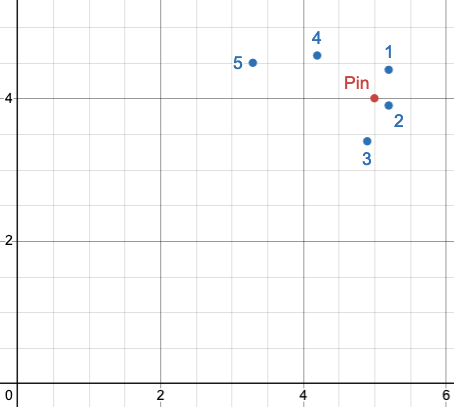
响应包含了距离指定标记位置最近的酒店:
{
  "took": 1093,
  "timed_out": false,
  "_shards": {
    "total": 1,
    "successful": 1,
    "skipped": 0,
    "failed": 0
  },
  "hits": {
    "total": {
      "value": 3,
      "relation": "eq"
    },
    "max_score": 0.952381,
    "hits": [
      {
        "_index": "hotels-index",
        "_id": "2",
        "_score": 0.952381,
        "_source": {
          "location": [
            5.2,
            3.9
          ]
        }
      },
      {
        "_index": "hotels-index",
        "_id": "1",
        "_score": 0.8333333,
        "_source": {
          "location": [
            5.2,
            4.4
          ]
        }
      },
      {
        "_index": "hotels-index",
        "_id": "3",
        "_score": 0.72992706,
        "_source": {
          "location": [
            4.9,
            3.4
          ]
        }
      }
    ]
  }
}
自动生成向量嵌入
如果您的数据尚未是向量格式,您可以直接在 UDB-SX 中生成向量嵌入。这允许您将文本或图像转换为其数值表示形式,以进行相似性搜索。更多信息,请参阅 自动生成向量嵌入。