数据查询
概览
1. 语法概览
SELECT <select_list>
    FROM <tables>
    [WHERE <condition>]
    [GROUP BY <groups>]
    [HAVING <group_filter>]
    [FILL <fill_methods>]
    [ORDER BY <order_expression>]
    [OFFSET <n>]
    [LIMIT <n>];
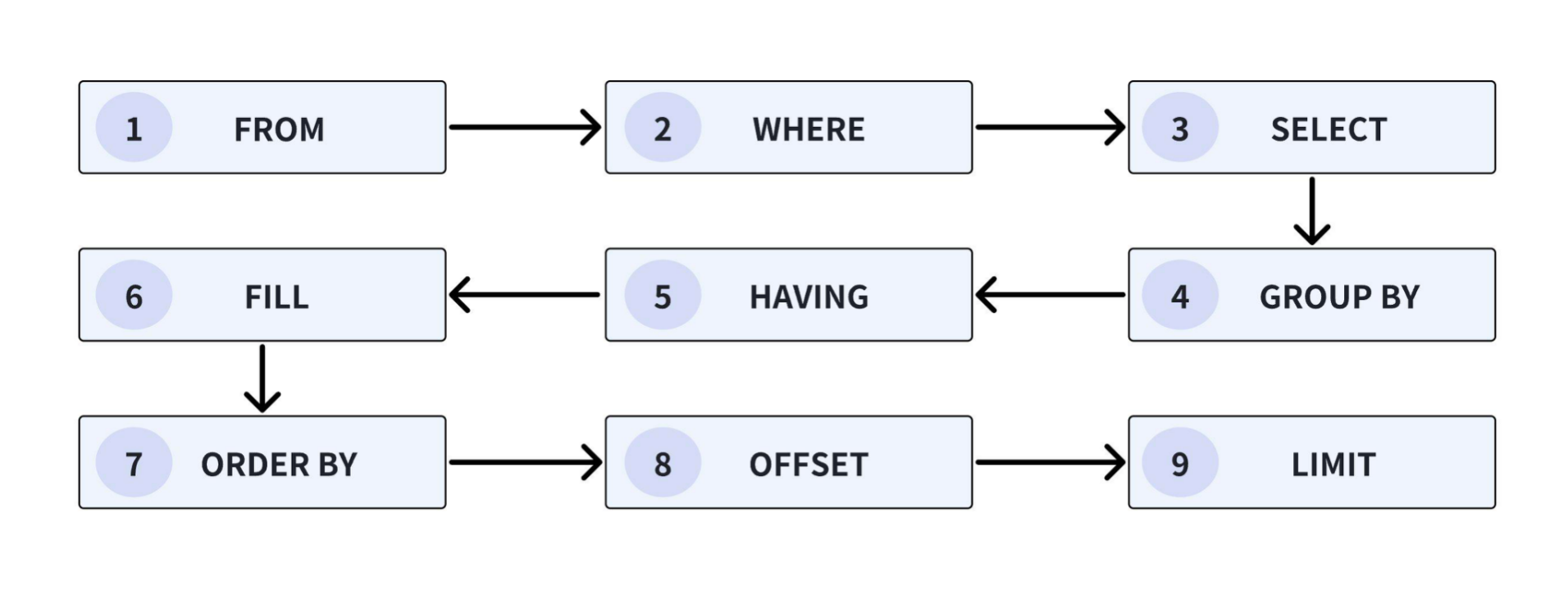
UDB-DS 查询语法提供以下子句:
SELECT 子句:查询结果应包含的列。详细语法见:SELECT子句
FROM 子句:指出查询的数据源,可以是单个表、多个通过
JOIN子句连接的表,或者是一个子查询。详细语法见:FROM & JOIN 子句WHERE 子句:用于过滤数据,只选择满足特定条件的数据行。这个子句在逻辑上紧跟在 FROM 子句之后执行。详细语法见:WHERE 子句
GROUP BY 子句:当需要对数据进行聚合时使用,指定了用于分组的列。详细语法见:GROUP BY 子句
HAVING 子句:在 GROUP BY 子句之后使用,用于对已经分组的数据进行过滤。与 WHERE 子句类似,但 HAVING 子句在分组后执行。详细语法见:HAVING 子句
FILL 子句:用于处理查询结果中的空值,用户可以使用 FILL 子句来指定数据缺失时的填充模式(如前一个非空值或线性插值)来填充 null 值,以便于数据可视化和分析。 详细语法见:FILL 子句
ORDER BY 子句:对查询结果进行排序,可以指定升序(ASC)或降序(DESC),以及 NULL 值的处理方式(NULLS FIRST 或 NULLS LAST)。详细语法见:ORDER BY 子句
OFFSET 子句:用于指定查询结果的起始位置,即跳过前 OFFSET 行。与 LIMIT 子句配合使用。详细语法见:LIMIT 子句
LIMIT 子句:限制查询结果的行数,通常与 OFFSET 子句一起使用以实现分页功能。详细语法见:OFFSET 子句
2. 子句执行顺序
SELECT 子句
1. 语法概览
SELECT setQuantifier? selectItem (',' selectItem)*

selectItem
    : expression (AS? identifier)?                          #selectSingle
    | tableName '.' ASTERISK (AS columnAliases)?            #selectAll
    | ASTERISK                                              #selectAll
    ;
setQuantifier
    : DISTINCT
    | ALL
    ;
SELECT 子句: 指定了查询结果应包含的列,包含聚合函数(如 SUM、AVG、COUNT 等)以及窗口函数,在逻辑上最后执行。
DISTINCT 关键字:
SELECT DISTINCT column_name确保查询结果中的值是唯一的,去除重复项。COLUMNS 函数:SELECT 子句中支持使用 COLUMNS 函数进行列筛选,并支持和表达式结合使用,使表达式的效果对所有筛选出的列生效。
2. 语法详释:
每个 selectItem 可以是以下形式之一:
表达式:
expression [ [ AS ] column_alias ]定义单个输出列,可以指定列别名。选择某个关系的所有列:
relation.*选择某个关系的所有列,不允许使用列别名。选择结果集中的所有列:
*选择查询的所有列,不允许使用列别名。
DISTINCT 的使用场景:
SELECT 语句:在 SELECT 语句中使用 DISTINCT,查询结果去除重复项。
聚合函数:与聚合函数一起使用时,DISTINCT 只处理输入数据集中的非重复行。
GROUP BY 子句:在 GROUP BY 子句中使用 ALL 和 DISTINCT 量词,决定是否每个重复的分组集产生不同的输出行。
COLUMNS 函数:
COLUMNS(*): 匹配所有列,支持结合表达式进行使用。COLUMNS(regexStr) ? AS identifier:正则匹配匹配所有列名满足正则表达式的列,支持结合表达式进行使用。
支持引用正则表达式捕获到的 groups 对列进行重命名,不写 AS 时展示原始列名(即 _coln_原始列名,其中 n 为列在结果表中的 position)。
重命名用法简述:
regexStr 中使用圆括号设置要捕获的组;
在 identifier 中使用
'$index'引用捕获到的组。
注意:使用该功能时,identifier 中会包含特殊字符 ‘$’,所以整个 identifier 要用双引号引起来。
3. 示例数据
在示例数据页面中,包含了用于构建表结构和插入数据的SQL语句,下载并在UDB-DS CLI中执行这些语句,即可将数据导入UDB-DS,您可以使用这些数据来测试和执行示例中的SQL语句,并获得相应的结果。
3.1 选择列表
3.1.1 星表达式
使用星号(*)可以选取表中的所有列,注意,星号表达式不能被大多数函数转换,除了count(*)的情况。
示例:从表中选择所有列
SELECT * FROM table1;
执行结果如下:
+-----------------------------+------+--------+---------+--------+-----------+-----------+--------+------+-----------------------------+
|                         time|region|plant_id|device_id|model_id|maintenance|temperature|humidity|status|                   modifytime|
+-----------------------------+------+--------+---------+--------+-----------+-----------+--------+------+-----------------------------+
|2024-11-29T11:00:00.000+08:00|  上海|    3002|      100|       E|        180|       null|    45.1|  true|                         null|
|2024-11-29T18:30:00.000+08:00|  上海|    3002|      100|       E|        180|       90.0|    35.4|  true|2024-11-29T18:30:15.000+08:00|
|2024-11-28T08:00:00.000+08:00|  上海|    3001|      100|       C|         90|       85.0|    null|  null|2024-11-28T08:00:09.000+08:00|
|2024-11-28T09:00:00.000+08:00|  上海|    3001|      100|       C|         90|       null|    40.9|  true|                         null|
|2024-11-28T10:00:00.000+08:00|  上海|    3001|      100|       C|         90|       85.0|    35.2|  null|2024-11-28T10:00:11.000+08:00|
|2024-11-28T11:00:00.000+08:00|  上海|    3001|      100|       C|         90|       88.0|    45.1|  true|2024-11-28T11:00:12.000+08:00|
|2024-11-26T13:37:00.000+08:00|  北京|    1001|      100|       A|        180|       90.0|    35.1|  true|2024-11-26T13:37:34.000+08:00|
|2024-11-26T13:38:00.000+08:00|  北京|    1001|      100|       A|        180|       90.0|    35.1|  true|2024-11-26T13:38:25.000+08:00|
|2024-11-30T09:30:00.000+08:00|  上海|    3002|      101|       F|        360|       90.0|    35.2|  true|                         null|
|2024-11-30T14:30:00.000+08:00|  上海|    3002|      101|       F|        360|       90.0|    34.8|  true|2024-11-30T14:30:17.000+08:00|
|2024-11-29T10:00:00.000+08:00|  上海|    3001|      101|       D|        360|       85.0|    null|  null|2024-11-29T10:00:13.000+08:00|
|2024-11-27T16:38:00.000+08:00|  北京|    1001|      101|       B|        180|       null|    35.1|  true|2024-11-26T16:37:01.000+08:00|
|2024-11-27T16:39:00.000+08:00|  北京|    1001|      101|       B|        180|       85.0|    35.3|  null|                         null|
|2024-11-27T16:40:00.000+08:00|  北京|    1001|      101|       B|        180|       85.0|    null|  null|2024-11-26T16:37:03.000+08:00|
|2024-11-27T16:41:00.000+08:00|  北京|    1001|      101|       B|        180|       85.0|    null|  null|2024-11-26T16:37:04.000+08:00|
|2024-11-27T16:42:00.000+08:00|  北京|    1001|      101|       B|        180|       null|    35.2| false|                         null|
|2024-11-27T16:43:00.000+08:00|  北京|    1001|      101|       B|        180|       null|    null| false|                         null|
|2024-11-27T16:44:00.000+08:00|  北京|    1001|      101|       B|        180|       null|    null| false|2024-11-26T16:37:08.000+08:00|
+-----------------------------+------+--------+---------+--------+-----------+-----------+--------+------+-----------------------------+
Total line number = 18
It costs 0.653s
3.1.2 聚合函数
聚合函数将多行数据汇总为单个值。当 SELECT 子句中存在聚合函数时,查询将被视为聚合查询。在聚合查询中,所有表达式必须是聚合函数的一部分或由GROUP BY子句指定的分组的一部分。
示例1:返回地址表中的总行数:
SELECT count(*) FROM table1;
执行结果如下:
+-----+
|_col0|
+-----+
|   18|
+-----+
Total line number = 1
It costs 0.091s
示例2:返回按城市分组的地址表中的总行数:
SELECT region, count(*)
  FROM table1
  GROUP BY region;
执行结果如下:
+------+-----+
|region|_col1|
+------+-----+
|  上海|    9|
|  北京|    9|
+------+-----+
Total line number = 2
It costs 0.071s
3.1.3 别名
关键字AS:为选定的列指定别名,别名将覆盖已存在的列名,以提高查询结果的可读性。
示例1:原始表格:
UDB-DS> SELECT * FROM table1;
执行结果如下:
+-----------------------------+------+--------+---------+--------+-----------+-----------+--------+------+-----------------------------+
|                         time|region|plant_id|device_id|model_id|maintenance|temperature|humidity|status|                   modifytime|
+-----------------------------+------+--------+---------+--------+-----------+-----------+--------+------+-----------------------------+
|2024-11-29T11:00:00.000+08:00|  上海|    3002|      100|       E|        180|       null|    45.1|  true|                         null|
|2024-11-29T18:30:00.000+08:00|  上海|    3002|      100|       E|        180|       90.0|    35.4|  true|2024-11-29T18:30:15.000+08:00|
|2024-11-28T08:00:00.000+08:00|  上海|    3001|      100|       C|         90|       85.0|    null|  null|2024-11-28T08:00:09.000+08:00|
|2024-11-28T09:00:00.000+08:00|  上海|    3001|      100|       C|         90|       null|    40.9|  true|                         null|
|2024-11-28T10:00:00.000+08:00|  上海|    3001|      100|       C|         90|       85.0|    35.2|  null|2024-11-28T10:00:11.000+08:00|
|2024-11-28T11:00:00.000+08:00|  上海|    3001|      100|       C|         90|       88.0|    45.1|  true|2024-11-28T11:00:12.000+08:00|
|2024-11-26T13:37:00.000+08:00|  北京|    1001|      100|       A|        180|       90.0|    35.1|  true|2024-11-26T13:37:34.000+08:00|
|2024-11-26T13:38:00.000+08:00|  北京|    1001|      100|       A|        180|       90.0|    35.1|  true|2024-11-26T13:38:25.000+08:00|
|2024-11-30T09:30:00.000+08:00|  上海|    3002|      101|       F|        360|       90.0|    35.2|  true|                         null|
|2024-11-30T14:30:00.000+08:00|  上海|    3002|      101|       F|        360|       90.0|    34.8|  true|2024-11-30T14:30:17.000+08:00|
|2024-11-29T10:00:00.000+08:00|  上海|    3001|      101|       D|        360|       85.0|    null|  null|2024-11-29T10:00:13.000+08:00|
|2024-11-27T16:38:00.000+08:00|  北京|    1001|      101|       B|        180|       null|    35.1|  true|2024-11-26T16:37:01.000+08:00|
|2024-11-27T16:39:00.000+08:00|  北京|    1001|      101|       B|        180|       85.0|    35.3|  null|                         null|
|2024-11-27T16:40:00.000+08:00|  北京|    1001|      101|       B|        180|       85.0|    null|  null|2024-11-26T16:37:03.000+08:00|
|2024-11-27T16:41:00.000+08:00|  北京|    1001|      101|       B|        180|       85.0|    null|  null|2024-11-26T16:37:04.000+08:00|
|2024-11-27T16:42:00.000+08:00|  北京|    1001|      101|       B|        180|       null|    35.2| false|                         null|
|2024-11-27T16:43:00.000+08:00|  北京|    1001|      101|       B|        180|       null|    null| false|                         null|
|2024-11-27T16:44:00.000+08:00|  北京|    1001|      101|       B|        180|       null|    null| false|2024-11-26T16:37:08.000+08:00|
+-----------------------------+------+--------+---------+--------+-----------+-----------+--------+------+-----------------------------+
Total line number = 18
It costs 0.653s
示例2:单列设置别名:
UDB-DS> SELECT device_id
         AS device
         FROM table1;
执行结果如下:
+------+
|device|
+------+
|   100|
|   100|
|   100|
|   100|
|   100|
|   100|
|   100|
|   100|
|   101|
|   101|
|   101|
|   101|
|   101|
|   101|
|   101|
|   101|
|   101|
|   101|
+------+
Total line number = 18
It costs 0.053s
示例3:所有列的别名:
UDB-DS> SELECT table1.*
         AS (timestamp, Reg, Pl, DevID, Mod, Mnt, Temp, Hum, Stat,MTime)
         FROM table1;
执行结果如下:
+-----------------------------+----+----+-----+---+---+----+----+-----+-----------------------------+
|                    TIMESTAMP| REG|  PL|DEVID|MOD|MNT|TEMP| HUM| STAT|                        MTIME|
+-----------------------------+----+----+-----+---+---+----+----+-----+-----------------------------+
|2024-11-29T11:00:00.000+08:00|上海|3002|  100|  E|180|null|45.1| true|                         null|
|2024-11-29T18:30:00.000+08:00|上海|3002|  100|  E|180|90.0|35.4| true|2024-11-29T18:30:15.000+08:00|
|2024-11-28T08:00:00.000+08:00|上海|3001|  100|  C| 90|85.0|null| null|2024-11-28T08:00:09.000+08:00|
|2024-11-28T09:00:00.000+08:00|上海|3001|  100|  C| 90|null|40.9| true|                         null|
|2024-11-28T10:00:00.000+08:00|上海|3001|  100|  C| 90|85.0|35.2| null|2024-11-28T10:00:11.000+08:00|
|2024-11-28T11:00:00.000+08:00|上海|3001|  100|  C| 90|88.0|45.1| true|2024-11-28T11:00:12.000+08:00|
|2024-11-26T13:37:00.000+08:00|北京|1001|  100|  A|180|90.0|35.1| true|2024-11-26T13:37:34.000+08:00|
|2024-11-26T13:38:00.000+08:00|北京|1001|  100|  A|180|90.0|35.1| true|2024-11-26T13:38:25.000+08:00|
|2024-11-30T09:30:00.000+08:00|上海|3002|  101|  F|360|90.0|35.2| true|                         null|
|2024-11-30T14:30:00.000+08:00|上海|3002|  101|  F|360|90.0|34.8| true|2024-11-30T14:30:17.000+08:00|
|2024-11-29T10:00:00.000+08:00|上海|3001|  101|  D|360|85.0|null| null|2024-11-29T10:00:13.000+08:00|
|2024-11-27T16:38:00.000+08:00|北京|1001|  101|  B|180|null|35.1| true|2024-11-26T16:37:01.000+08:00|
|2024-11-27T16:39:00.000+08:00|北京|1001|  101|  B|180|85.0|35.3| null|                         null|
|2024-11-27T16:40:00.000+08:00|北京|1001|  101|  B|180|85.0|null| null|2024-11-26T16:37:03.000+08:00|
|2024-11-27T16:41:00.000+08:00|北京|1001|  101|  B|180|85.0|null| null|2024-11-26T16:37:04.000+08:00|
|2024-11-27T16:42:00.000+08:00|北京|1001|  101|  B|180|null|35.2|false|                         null|
|2024-11-27T16:43:00.000+08:00|北京|1001|  101|  B|180|null|null|false|                         null|
|2024-11-27T16:44:00.000+08:00|北京|1001|  101|  B|180|null|null|false|2024-11-26T16:37:08.000+08:00|
+-----------------------------+----+----+-----+---+---+----+----+-----+-----------------------------+
Total line number = 18
It costs 0.189s
3.2 Columns 函数
不结合表达式
-- 查询列名以 'm' 开头的列的数据
UDB-DS:database1> select columns('^m.*') from table1 limit 5
+--------+-----------+
|model_id|maintenance|
+--------+-----------+
|       E|        180|
|       E|        180|
|       C|         90|
|       C|         90|
|       C|         90|
+--------+-----------+


-- 查询列名以 'o' 开头的列,未匹配到任何列,抛出异常
UDB-DS:database1> select columns('^o.*') from table1 limit 5
Msg: com.unvdb.udbds.jdbc.UDBDSSQLException: 701: No matching columns found that match regex '^o.*'


-- 查询列名以 'm' 开头的列的数据,并重命名以 'series_' 开头
UDB-DS:database1> select columns('^m(.*)') AS "series_$0" from table1 limit 5
+---------------+------------------+
|series_model_id|series_maintenance|
+---------------+------------------+
|              E|               180|
|              E|               180|
|              C|                90|
|              C|                90|
|              C|                90|
+---------------+------------------+
结合表达式
单个 COLUMNS 函数
-- 查询所有列的最小值
UDB-DS:database1> select min(columns(*)) from table1
+-----------------------------+------------+--------------+---------------+--------------+-----------------+-----------------+--------------+------------+-----------------------------+
|                   _col0_time|_col1_region|_col2_plant_id|_col3_device_id|_col4_model_id|_col5_maintenance|_col6_temperature|_col7_humidity|_col8_status|           _col9_arrival_time|
+-----------------------------+------------+--------------+---------------+--------------+-----------------+-----------------+--------------+------------+-----------------------------+
|2024-11-26T13:37:00.000+08:00|        上海|          1001|            100|             A|              180|             85.0|          34.8|       false|2024-11-26T13:37:34.000+08:00|
+-----------------------------+------------+--------------+---------------+--------------+-----------------+-----------------+--------------+------------+-----------------------------+
多个 COLUMNS 函数,出现在同一表达式
使用限制:出现多个 COLUMNS 函数时,多个 COLUMNS 函数的参数要完全相同
-- 查询 'h' 开头列的最小值和最大值之和
UDB-DS:database1> select min(columns('^h.*')) + max(columns('^h.*')) from table1
+--------------+
|_col0_humidity|
+--------------+
|     79.899994|
+--------------+

-- 错误查询,两个 COLUMNS 函数不完全相同
UDB-DS:database1> select min(columns('^h.*')) + max(columns('^t.*')) from table1
Msg: com.unvdb.udbds.jdbc.UDBDSSQLException: 701: Multiple different COLUMNS in the same expression are not supported
多个 COLUMNS 函数,出现在不同表达式
-- 分别查询 'h' 开头列的最小值和最大值
UDB-DS:database1> select min(columns('^h.*')) , max(columns('^h.*')) from table1
+--------------+--------------+
|_col0_humidity|_col1_humidity|
+--------------+--------------+
|          34.8|          45.1|
+--------------+--------------+

-- 分别查询 'h' 开头列的最小值和 'te'开头列的最大值
UDB-DS:database1> select min(columns('^h.*')) , max(columns('^te.*')) from table1
+--------------+-----------------+
|_col0_humidity|_col1_temperature|
+--------------+-----------------+
|          34.8|             90.0|
+--------------+-----------------+
在 WHERE 子句中使用
-- 查询数据,所有 'h' 开头列的数据必须要大于 40
UDB-DS:database1> select * from table1 where columns('^h.*') > 40
+-----------------------------+------+--------+---------+--------+-----------+-----------+--------+------+-----------------------------+
|                         time|region|plant_id|device_id|model_id|maintenance|temperature|humidity|status|                 arrival_time|
+-----------------------------+------+--------+---------+--------+-----------+-----------+--------+------+-----------------------------+
|2024-11-29T11:00:00.000+08:00|  上海|    3002|      100|       E|        180|       null|    45.1|  true|                         null|
|2024-11-28T09:00:00.000+08:00|  上海|    3001|      100|       C|         90|       null|    40.9|  true|                         null|
|2024-11-28T11:00:00.000+08:00|  上海|    3001|      100|       C|         90|       88.0|    45.1|  true|2024-11-28T11:00:12.000+08:00|
+-----------------------------+------+--------+---------+--------+-----------+-----------+--------+------+-----------------------------+
--等价于
UDB-DS:database1> select * from table1 where humidity > 40;
+-----------------------------+------+--------+---------+--------+-----------+-----------+--------+------+-----------------------------+
|                         time|region|plant_id|device_id|model_id|maintenance|temperature|humidity|status|                 arrival_time|
+-----------------------------+------+--------+---------+--------+-----------+-----------+--------+------+-----------------------------+
|2024-11-29T11:00:00.000+08:00|  上海|    3002|      100|       E|        180|       null|    45.1|  true|                         null|
|2024-11-28T09:00:00.000+08:00|  上海|    3001|      100|       C|         90|       null|    40.9|  true|                         null|
|2024-11-28T11:00:00.000+08:00|  上海|    3001|      100|       C|         90|       88.0|    45.1|  true|2024-11-28T11:00:12.000+08:00|
+-----------------------------+------+--------+---------+--------+-----------+-----------+--------+------+-----------------------------+
4. 结果集列顺序
列顺序: 结果集中的列顺序与 SELECT 子句中指定的顺序相同。
多列排序: 如果选择表达式返回多个列,它们的排序方式与源关系中的排序方式相同
FROM & JOIN 子句
1. 语法概览
FROM relation (',' relation)*

relation
    : relation joinType JOIN relation joinCriteria
    | aliasedRelation
    ;

joinType
    : INNER?
    | FULL OUTER?
    | CROSS?
    | ASOF?
    ;

joinCriteria
    : ON booleanExpression
    | USING '(' identifier (',' identifier)* ')'
    ;

aliasedRelation
    : relationPrimary (AS? identifier columnAliases?)?
    ;

columnAliases
    : '(' identifier (',' identifier)* ')'
    ;

relationPrimary
    : qualifiedName                                              #tableName
    | '(' query ')'                                              #subqueryRelation
    | '(' relation ')'                                           #parenthesizedRelation
    ;

qualifiedName
    : identifier ('.' identifier)*
    ;
2. FROM 子句
FROM 子句指定了查询操作的数据源。在逻辑上,查询的执行从 FROM 子句开始。FROM 子句可以包含单个表、使用 JOIN 子句连接的多个表的组合,或者子查询中的另一个 SELECT 查询。
3. JOIN 子句
JOIN 用于将两个表基于某些条件连接起来,通常,连接条件是一个谓词,但也可以指定其他隐含的规则。
在当前版本的 UDB-DS 中,支持以下连接方式:
内连接(Inner Join),连接条件只能是时间列的等值连接。
全外连接(Full Outer Join),连接条件可以是任意等值表达式。
交叉连接(Cross Join)
ASOF JOIN(AS OF a specific point in time,特定时间点),是一种基于时间或近似匹配条件的特殊连接操作,适用于两个数据集的时间戳不完全对齐的场景。它能够为左表的每一行找到右表中时间最接近且满足条件的对应行,常用于处理时间序列数据(如传感器数据、金融行情等)。
3.1 内连接(Inner Join)
INNER JOIN 表示内连接,其中 INNER 关键字可以省略。它返回两个表中满足连接条件的记录,舍弃不满足的记录,等同于两个表的交集。
3.1.1 显式指定连接条件(推荐)
显式连接需要使用 JOIN + ON 或 JOIN + USING 语法,在 ON 或 USING 关键字后指定连接条件。
SQL语法如下所示:
-- 显式连接, 在ON关键字后指定连接条件或在Using关键字后指定连接列
SELECT selectExpr [, selectExpr] ... FROM <TABLE_NAME> [INNER] JOIN <TABLE_NAME> joinCriteria [WHERE whereCondition]

joinCriteria
    : ON booleanExpression
    | USING '(' identifier (',' identifier)* ')'
    ;
注意:USING 和 ON 的区别
USING 是显式连接条件的缩写语法,它接收一个用逗号分隔的字段名列表,这些字段必须是连接表共有的字段。例如,USING (time) 等效于 ON (t1.time = t2.time)。当使用 ON 关键字时,两个表中的 time 字段在逻辑上是区分的,分别表示为 t1.time 和 t2.time。而当使用 USING 关键字时,逻辑上只会有一个 time 字段。而最终的查询结果取决于 SELECT 语句中指定的字段。
3.1.2 隐式指定连接条件
隐式连接不需要出现 JOIN、ON、USING 关键字,而是通过在 WHERE 子句中指定条件来实现表与表之间的连接。
SQL语法如下所示:
-- 隐式连接, 在WHERE子句里指定连接条件
SELECT selectExpr [, selectExpr] ... FROM <TABLE_NAME> [, <TABLE_NAME>] ... [WHERE whereCondition]
3.2 外连接(Outer Join)
如果没有匹配的行,仍然可以通过指定外连接返回行。外连接可以是:
LEFT(左侧表的所有行至少出现一次)
RIGHT(右侧表的所有行至少出现一次)
FULL(两个表的所有行至少出现一次)
在当前版本的 UDB-DS 中,只支持 FULL [OUTER] JOIN,即全外连接,返回左表和右表连接后的所有记录。如果某个表中的记录没有与另一个表中的记录匹配,则会返回 NULL 值。FULL JOIN 只能使用显式连接方式。
SQL语法如下所示:
-- 在ON关键字后指定连接条件或在Using关键字后指定连接列
SELECT selectExpr [, selectExpr] ... FROM <TABLE_NAME> FULL [OUTER] JOIN <TABLE_NAME> joinCriteria [WHERE whereCondition]

joinCriteria
    : ON booleanExpression
    | USING '(' identifier (',' identifier)* ')'
    ;
3.3 交叉连接(Cross Join)
交叉连接表示两个表的的笛卡尔积,返回左表N行记录和右表M行记录的N*M种组合。该种连接方式在实际中使用最少。
3.4 非精确点连接(ASOF JOIN)
UDB-DS ASOF JOIN 即非精确点连接方式,允许用户按照指定的规则以时间戳最接近的方式进行匹配。目前版本只支持针对 Time 列的 ASOF INNER JOIN。
SQL语法如下所示:
SELECT selectExpr [, selectExpr] ... FROM
<TABLE_NAME1> ASOF[(tolerance theta)] [INNER] JOIN <TABLE_NAME2> joinCriteria
[WHERE whereCondition]
WHERE a.time = tolerance(b.time, 1s)

joinCriteria
    : ON <TABLE_NAME1>.time comparisonOperator <TABLE_NAME2>.time
    ;

comparisonOperator
    : < | <= | > | >=
    ;
说明:
ASOF JOIN 默认使用 ASOF INNER JOIN 实现
当使用 ON 关键字进行连接时,连接条件里必须包含针对 Time 列的不等式连接条件,不等式仅支持
">", ">=", "<", "<="四种操作符,其代表的连接匹配规则如下:其中 lt 表示 left table, rt 表示 right table
| 运算符 | 连接方式 |
|---|---|
lt.time >= rt.time |
左表中时间戳大于等于右表时间戳且时间戳最接近 |
lt.time > rt.time |
左表中时间戳大于左表时间戳且时间戳最接近 |
lt.time <= rt.time |
左表中时间戳小于等于右表时间戳且时间戳最接近 |
lt.time < rt.time |
左表中时间戳小于右表时间戳且时间戳最接近 |
Tolerance 参数:容差,表示右表数据查找允许的最大时间差。(用 TimeDuration 表示,如 1d 表示1天)。如果不指定 Tolerance 参数,则表示查找时间范围为正无穷。注意:目前仅 ASOF INNER JOIN 中支持该参数
4. 示例数据
在示例数据页面中,包含了用于构建表结构和插入数据的SQL语句,下载并在UDB-DS CLI中执行这些语句,即可将数据导入UDB-DS,您可以使用这些数据来测试和执行示例中的SQL语句,并获得相应的结果。
4.1 From 示例
4.1.1 从单个表查询
示例 1:此查询将返回 table1 中的所有记录,并按时间排序。
SELECT * FROM table1 ORDER BY time;
查询结果:
+-----------------------------+------+--------+---------+--------+-----------+-----------+--------+------+-----------------------------+
|                         time|region|plant_id|device_id|model_id|maintenance|temperature|humidity|status|                arrival_time|
+-----------------------------+------+--------+---------+--------+-----------+-----------+--------+------+-----------------------------+
|2024-11-26T13:37:00.000+08:00|  北京|    1001|      100|       A|        180|       90.0|    35.1|  true|2024-11-26T13:37:34.000+08:00|
|2024-11-26T13:38:00.000+08:00|  北京|    1001|      100|       A|        180|       90.0|    35.1|  true|2024-11-26T13:38:25.000+08:00|
|2024-11-27T16:38:00.000+08:00|  北京|    1001|      101|       B|        180|       null|    35.1|  true|2024-11-27T16:37:01.000+08:00|
|2024-11-27T16:39:00.000+08:00|  北京|    1001|      101|       B|        180|       85.0|    35.3|  null|                         null|
|2024-11-27T16:40:00.000+08:00|  北京|    1001|      101|       B|        180|       85.0|    null|  null|2024-11-27T16:37:03.000+08:00|
|2024-11-27T16:41:00.000+08:00|  北京|    1001|      101|       B|        180|       85.0|    null|  null|2024-11-27T16:37:04.000+08:00|
|2024-11-27T16:42:00.000+08:00|  北京|    1001|      101|       B|        180|       null|    35.2| false|                         null|
|2024-11-27T16:43:00.000+08:00|  北京|    1001|      101|       B|        180|       null|    null| false|                         null|
|2024-11-27T16:44:00.000+08:00|  北京|    1001|      101|       B|        180|       null|    null| false|2024-11-27T16:37:08.000+08:00|
|2024-11-28T08:00:00.000+08:00|  上海|    3001|      100|       C|         90|       85.0|    null|  null|2024-11-28T08:00:09.000+08:00|
|2024-11-28T09:00:00.000+08:00|  上海|    3001|      100|       C|         90|       null|    40.9|  true|                         null|
|2024-11-28T10:00:00.000+08:00|  上海|    3001|      100|       C|         90|       85.0|    35.2|  null|2024-11-28T10:00:11.000+08:00|
|2024-11-28T11:00:00.000+08:00|  上海|    3001|      100|       C|         90|       88.0|    45.1|  true|2024-11-28T11:00:12.000+08:00|
|2024-11-29T10:00:00.000+08:00|  上海|    3001|      101|       D|        360|       85.0|    null|  null|2024-11-29T10:00:13.000+08:00|
|2024-11-29T11:00:00.000+08:00|  上海|    3002|      100|       E|        180|       null|    45.1|  true|                         null|
|2024-11-29T18:30:00.000+08:00|  上海|    3002|      100|       E|        180|       90.0|    35.4|  true|2024-11-29T18:30:15.000+08:00|
|2024-11-30T09:30:00.000+08:00|  上海|    3002|      101|       F|        360|       90.0|    35.2|  true|                         null|
|2024-11-30T14:30:00.000+08:00|  上海|    3002|      101|       F|        360|       90.0|    34.8|  true|2024-11-30T14:30:17.000+08:00|
+-----------------------------+------+--------+---------+--------+-----------+-----------+--------+------+-----------------------------+
Total line number = 18
It costs 0.085s
示例 2:此查询将返回 table1中device为101的记录,并按时间排序。
SELECT * FROM table1 t1 where t1.device_id='101' order by time;
查询结果:
+-----------------------------+------+--------+---------+--------+-----------+-----------+--------+------+-----------------------------+
|                         time|region|plant_id|device_id|model_id|maintenance|temperature|humidity|status|                arrival_time|
+-----------------------------+------+--------+---------+--------+-----------+-----------+--------+------+-----------------------------+
|2024-11-27T16:38:00.000+08:00|  北京|    1001|      101|       B|        180|       null|    35.1|  true|2024-11-27T16:37:01.000+08:00|
|2024-11-27T16:39:00.000+08:00|  北京|    1001|      101|       B|        180|       85.0|    35.3|  null|                         null|
|2024-11-27T16:40:00.000+08:00|  北京|    1001|      101|       B|        180|       85.0|    null|  null|2024-11-27T16:37:03.000+08:00|
|2024-11-27T16:41:00.000+08:00|  北京|    1001|      101|       B|        180|       85.0|    null|  null|2024-11-27T16:37:04.000+08:00|
|2024-11-27T16:42:00.000+08:00|  北京|    1001|      101|       B|        180|       null|    35.2| false|                         null|
|2024-11-27T16:43:00.000+08:00|  北京|    1001|      101|       B|        180|       null|    null| false|                         null|
|2024-11-27T16:44:00.000+08:00|  北京|    1001|      101|       B|        180|       null|    null| false|2024-11-27T16:37:08.000+08:00|
|2024-11-29T10:00:00.000+08:00|  上海|    3001|      101|       D|        360|       85.0|    null|  null|2024-11-29T10:00:13.000+08:00|
|2024-11-30T09:30:00.000+08:00|  上海|    3002|      101|       F|        360|       90.0|    35.2|  true|                         null|
|2024-11-30T14:30:00.000+08:00|  上海|    3002|      101|       F|        360|       90.0|    34.8|  true|2024-11-30T14:30:17.000+08:00|
+-----------------------------+------+--------+---------+--------+-----------+-----------+--------+------+-----------------------------+
Total line number = 10
It costs 0.061s
4.1.2 从子查询中查询
示例 1:此查询将返回 table1 中的记录总数。
SELECT COUNT(*) AS count FROM (SELECT * FROM table1);
查询结果:
+-----+
|count|
+-----+
|   18|
+-----+
Total line number = 1
It costs 0.072s
4.2 Join 示例
4.2.1 Inner Join
示例 1:显式连接
SELECT
  t1.time,
  t1.device_id as device1,
  t1.temperature as temperature1,
  t2.device_id as device2,
  t2.temperature as temperature2
FROM
  table1 t1 JOIN table2 t2
ON t1.time = t2.time
查询结果:
+-----------------------------+-------+------------+-------+------------+
|                         time|device1|temperature1|device2|temperature2|
+-----------------------------+-------+------------+-------+------------+
|2024-11-26T13:37:00.000+08:00|    100|        90.0|    100|        90.0|
|2024-11-28T08:00:00.000+08:00|    100|        85.0|    100|        85.0|
|2024-11-29T11:00:00.000+08:00|    100|        null|    100|        null|
+-----------------------------+-------+------------+-------+------------+
Total line number = 3
It costs 0.076s
示例 2:显式连接
SELECT time,
  t1.device_id as device1,
  t1.temperature as temperature1,
  t2.device_id as device2,
  t2.temperature as temperature2
FROM
  table1 t1 JOIN table2 t2
USING(time)
查询结果:
+-----------------------------+-------+------------+-------+------------+
|                         time|device1|temperature1|device2|temperature2|
+-----------------------------+-------+------------+-------+------------+
|2024-11-26T13:37:00.000+08:00|    100|        90.0|    100|        90.0|
|2024-11-28T08:00:00.000+08:00|    100|        85.0|    100|        85.0|
|2024-11-29T11:00:00.000+08:00|    100|        null|    100|        null|
+-----------------------------+-------+------------+-------+------------+
Total line number = 3
It costs 0.081s
示例 3:隐式连接
SELECT t1.time,
  t1.device_id as device1,
  t1.temperature as temperature1,
  t2.device_id as device2,
  t2.temperature as temperature2
FROM
table1 t1, table2 t2
WHERE
t1.time=t2.time
查询结果:
+-----------------------------+-------+------------+-------+------------+
|                         time|device1|temperature1|device2|temperature2|
+-----------------------------+-------+------------+-------+------------+
|2024-11-26T13:37:00.000+08:00|    100|        90.0|    100|        90.0|
|2024-11-28T08:00:00.000+08:00|    100|        85.0|    100|        85.0|
|2024-11-29T11:00:00.000+08:00|    100|        null|    100|        null|
+-----------------------------+-------+------------+-------+------------+
Total line number = 3
It costs 0.082s
4.2.2 Outer Join
示例 1:显式连接
SELECT
  t1.time as time1, t2.time as time2,
  t1.device_id as device1,
  t1.temperature as temperature1,
  t2.device_id as device2,
  t2.temperature as temperature2
FROM
  table1 t1 FULL JOIN table2 t2
ON t1.time = t2.time
查询结果:
+-----------------------------+-----------------------------+-------+------------+-------+------------+
|                        time1|                        time2|device1|temperature1|device2|temperature2|
+-----------------------------+-----------------------------+-------+------------+-------+------------+
|2024-11-26T13:37:00.000+08:00|2024-11-26T13:37:00.000+08:00|    100|        90.0|    100|        90.0|
|2024-11-26T13:38:00.000+08:00|                         null|    100|        90.0|   null|        null|
|                         null|2024-11-27T00:00:00.000+08:00|   null|        null|    101|        85.0|
|2024-11-27T16:38:00.000+08:00|                         null|    101|        null|   null|        null|
|2024-11-27T16:39:00.000+08:00|                         null|    101|        85.0|   null|        null|
|2024-11-27T16:40:00.000+08:00|                         null|    101|        85.0|   null|        null|
|2024-11-27T16:41:00.000+08:00|                         null|    101|        85.0|   null|        null|
|2024-11-27T16:42:00.000+08:00|                         null|    101|        null|   null|        null|
|2024-11-27T16:43:00.000+08:00|                         null|    101|        null|   null|        null|
|2024-11-27T16:44:00.000+08:00|                         null|    101|        null|   null|        null|
|2024-11-28T08:00:00.000+08:00|2024-11-28T08:00:00.000+08:00|    100|        85.0|    100|        85.0|
|2024-11-28T09:00:00.000+08:00|                         null|    100|        null|   null|        null|
|2024-11-28T10:00:00.000+08:00|                         null|    100|        85.0|   null|        null|
|2024-11-28T11:00:00.000+08:00|                         null|    100|        88.0|   null|        null|
|                         null|2024-11-29T00:00:00.000+08:00|   null|        null|    101|        85.0|
|2024-11-29T10:00:00.000+08:00|                         null|    101|        85.0|   null|        null|
|2024-11-29T11:00:00.000+08:00|2024-11-29T11:00:00.000+08:00|    100|        null|    100|        null|
|2024-11-29T18:30:00.000+08:00|                         null|    100|        90.0|   null|        null|
|                         null|2024-11-30T00:00:00.000+08:00|   null|        null|    101|        90.0|
|2024-11-30T09:30:00.000+08:00|                         null|    101|        90.0|   null|        null|
|2024-11-30T14:30:00.000+08:00|                         null|    101|        90.0|   null|        null|
+-----------------------------+-----------------------------+-------+------------+-------+------------+
Total line number = 21
It costs 0.071s
示例 2:显式连接
SELECT
  time,
  t1.device_id as device1,
  t1.temperature as temperature1,
  t2.device_id as device2,
  t2.temperature as temperature2
FROM
  table1 t1 FULL JOIN table2 t2
USING(time)
查询结果:
+-----------------------------+-------+------------+-------+------------+
|                         time|device1|temperature1|device2|temperature2|
+-----------------------------+-------+------------+-------+------------+
|2024-11-26T13:37:00.000+08:00|    100|        90.0|    100|        90.0|
|2024-11-26T13:38:00.000+08:00|    100|        90.0|   null|        null|
|2024-11-27T00:00:00.000+08:00|   null|        null|    101|        85.0|
|2024-11-27T16:38:00.000+08:00|    101|        null|   null|        null|
|2024-11-27T16:39:00.000+08:00|    101|        85.0|   null|        null|
|2024-11-27T16:40:00.000+08:00|    101|        85.0|   null|        null|
|2024-11-27T16:41:00.000+08:00|    101|        85.0|   null|        null|
|2024-11-27T16:42:00.000+08:00|    101|        null|   null|        null|
|2024-11-27T16:43:00.000+08:00|    101|        null|   null|        null|
|2024-11-27T16:44:00.000+08:00|    101|        null|   null|        null|
|2024-11-28T08:00:00.000+08:00|    100|        85.0|    100|        85.0|
|2024-11-28T09:00:00.000+08:00|    100|        null|   null|        null|
|2024-11-28T10:00:00.000+08:00|    100|        85.0|   null|        null|
|2024-11-28T11:00:00.000+08:00|    100|        88.0|   null|        null|
|2024-11-29T00:00:00.000+08:00|   null|        null|    101|        85.0|
|2024-11-29T10:00:00.000+08:00|    101|        85.0|   null|        null|
|2024-11-29T11:00:00.000+08:00|    100|        null|    100|        null|
|2024-11-29T18:30:00.000+08:00|    100|        90.0|   null|        null|
|2024-11-30T00:00:00.000+08:00|   null|        null|    101|        90.0|
|2024-11-30T09:30:00.000+08:00|    101|        90.0|   null|        null|
|2024-11-30T14:30:00.000+08:00|    101|        90.0|   null|        null|
+-----------------------------+-------+------------+-------+------------+
Total line number = 21
It costs 0.073s
示例3:连接条件为非time列
SELECT
  region,
  t1.time as time1,
  t1.temperature as temperature1,
  t2.time as time2,
  t2.temperature as temperature2
FROM
  table1 t1 FULL JOIN table2 t2
USING(region)
LIMIT 10
查询结果:
+------+-----------------------------+------------+-----------------------------+------------+
|region|                        time1|temperature1|                        time2|temperature2|
+------+-----------------------------+------------+-----------------------------+------------+
|  上海|2024-11-29T11:00:00.000+08:00|        null|2024-11-29T11:00:00.000+08:00|        null|
|  上海|2024-11-29T11:00:00.000+08:00|        null|2024-11-28T08:00:00.000+08:00|        85.0|
|  上海|2024-11-29T11:00:00.000+08:00|        null|2024-11-30T00:00:00.000+08:00|        90.0|
|  上海|2024-11-29T11:00:00.000+08:00|        null|2024-11-29T00:00:00.000+08:00|        85.0|
|  上海|2024-11-30T09:30:00.000+08:00|        90.0|2024-11-29T11:00:00.000+08:00|        null|
|  上海|2024-11-30T09:30:00.000+08:00|        90.0|2024-11-28T08:00:00.000+08:00|        85.0|
|  上海|2024-11-30T09:30:00.000+08:00|        90.0|2024-11-30T00:00:00.000+08:00|        90.0|
|  上海|2024-11-30T09:30:00.000+08:00|        90.0|2024-11-29T00:00:00.000+08:00|        85.0|
|  上海|2024-11-29T18:30:00.000+08:00|        90.0|2024-11-29T11:00:00.000+08:00|        null|
|  上海|2024-11-29T18:30:00.000+08:00|        90.0|2024-11-28T08:00:00.000+08:00|        85.0|
+------+-----------------------------+------------+-----------------------------+------------+
Total line number = 10
It costs 0.040s
4.2.3 Cross Join
示例1: 显示连接
SELECT table1.*, table2.* FROM table1 CROSS JOIN table2 LIMIT 8;
查询结果:
+-----------------------------+------+--------+---------+--------+-----------+-----------+--------+------+-----------------------------+-----------------------------+------+--------+---------+--------+-----------+-----------+--------+------+-----------------------------+
|                         time|region|plant_id|device_id|model_id|maintenance|temperature|humidity|status|                 arrival_time|                         time|region|plant_id|device_id|model_id|maintenance|temperature|humidity|status|                 arrival_time|
+-----------------------------+------+--------+---------+--------+-----------+-----------+--------+------+-----------------------------+-----------------------------+------+--------+---------+--------+-----------+-----------+--------+------+-----------------------------+
|2024-11-30T09:30:00.000+08:00|  上海|    3002|      101|       F|        360|       90.0|    35.2|  true|                         null|2024-11-30T00:00:00.000+08:00|  上海|    3002|      101|       F|        360|       90.0|    35.2|  true|                         null|
|2024-11-30T09:30:00.000+08:00|  上海|    3002|      101|       F|        360|       90.0|    35.2|  true|                         null|2024-11-29T00:00:00.000+08:00|  上海|    3001|      101|       D|        360|       85.0|    35.1|  null|2024-11-29T10:00:13.000+08:00|
|2024-11-30T09:30:00.000+08:00|  上海|    3002|      101|       F|        360|       90.0|    35.2|  true|                         null|2024-11-27T00:00:00.000+08:00|  北京|    1001|      101|       B|        180|       85.0|    35.1|  true|2024-11-27T16:37:01.000+08:00|
|2024-11-30T09:30:00.000+08:00|  上海|    3002|      101|       F|        360|       90.0|    35.2|  true|                         null|2024-11-29T11:00:00.000+08:00|  上海|    3002|      100|       E|        180|       null|    45.1|  true|                         null|
|2024-11-30T09:30:00.000+08:00|  上海|    3002|      101|       F|        360|       90.0|    35.2|  true|                         null|2024-11-28T08:00:00.000+08:00|  上海|    3001|      100|       C|         90|       85.0|    35.2| false|2024-11-28T08:00:09.000+08:00|
|2024-11-30T09:30:00.000+08:00|  上海|    3002|      101|       F|        360|       90.0|    35.2|  true|                         null|2024-11-26T13:37:00.000+08:00|  北京|    1001|      100|       A|        180|       90.0|    35.1|  true|2024-11-26T13:37:34.000+08:00|
|2024-11-30T14:30:00.000+08:00|  上海|    3002|      101|       F|        360|       90.0|    34.8|  true|2024-11-30T14:30:17.000+08:00|2024-11-30T00:00:00.000+08:00|  上海|    3002|      101|       F|        360|       90.0|    35.2|  true|                         null|
|2024-11-30T14:30:00.000+08:00|  上海|    3002|      101|       F|        360|       90.0|    34.8|  true|2024-11-30T14:30:17.000+08:00|2024-11-29T00:00:00.000+08:00|  上海|    3001|      101|       D|        360|       85.0|    35.1|  null|2024-11-29T10:00:13.000+08:00|
+-----------------------------+------+--------+---------+--------+-----------+-----------+--------+------+-----------------------------+-----------------------------+------+--------+---------+--------+-----------+-----------+--------+------+-----------------------------+
Total line number = 8
It costs 0.282s
示例2: 隐式连接
SELECT table1.*, table2.* FROM table1, table2 LIMIT 8;
查询结果:
+-----------------------------+------+--------+---------+--------+-----------+-----------+--------+------+-----------------------------+-----------------------------+------+--------+---------+--------+-----------+-----------+--------+------+-----------------------------+
|                         time|region|plant_id|device_id|model_id|maintenance|temperature|humidity|status|                 arrival_time|                         time|region|plant_id|device_id|model_id|maintenance|temperature|humidity|status|                 arrival_time|
+-----------------------------+------+--------+---------+--------+-----------+-----------+--------+------+-----------------------------+-----------------------------+------+--------+---------+--------+-----------+-----------+--------+------+-----------------------------+
|2024-11-30T09:30:00.000+08:00|  上海|    3002|      101|       F|        360|       90.0|    35.2|  true|                         null|2024-11-30T00:00:00.000+08:00|  上海|    3002|      101|       F|        360|       90.0|    35.2|  true|                         null|
|2024-11-30T09:30:00.000+08:00|  上海|    3002|      101|       F|        360|       90.0|    35.2|  true|                         null|2024-11-29T00:00:00.000+08:00|  上海|    3001|      101|       D|        360|       85.0|    35.1|  null|2024-11-29T10:00:13.000+08:00|
|2024-11-30T09:30:00.000+08:00|  上海|    3002|      101|       F|        360|       90.0|    35.2|  true|                         null|2024-11-27T00:00:00.000+08:00|  北京|    1001|      101|       B|        180|       85.0|    35.1|  true|2024-11-27T16:37:01.000+08:00|
|2024-11-30T09:30:00.000+08:00|  上海|    3002|      101|       F|        360|       90.0|    35.2|  true|                         null|2024-11-29T11:00:00.000+08:00|  上海|    3002|      100|       E|        180|       null|    45.1|  true|                         null|
|2024-11-30T09:30:00.000+08:00|  上海|    3002|      101|       F|        360|       90.0|    35.2|  true|                         null|2024-11-28T08:00:00.000+08:00|  上海|    3001|      100|       C|         90|       85.0|    35.2| false|2024-11-28T08:00:09.000+08:00|
|2024-11-30T09:30:00.000+08:00|  上海|    3002|      101|       F|        360|       90.0|    35.2|  true|                         null|2024-11-26T13:37:00.000+08:00|  北京|    1001|      100|       A|        180|       90.0|    35.1|  true|2024-11-26T13:37:34.000+08:00|
|2024-11-30T14:30:00.000+08:00|  上海|    3002|      101|       F|        360|       90.0|    34.8|  true|2024-11-30T14:30:17.000+08:00|2024-11-30T00:00:00.000+08:00|  上海|    3002|      101|       F|        360|       90.0|    35.2|  true|                         null|
|2024-11-30T14:30:00.000+08:00|  上海|    3002|      101|       F|        360|       90.0|    34.8|  true|2024-11-30T14:30:17.000+08:00|2024-11-29T00:00:00.000+08:00|  上海|    3001|      101|       D|        360|       85.0|    35.1|  null|2024-11-29T10:00:13.000+08:00|
+-----------------------------+------+--------+---------+--------+-----------+-----------+--------+------+-----------------------------+-----------------------------+------+--------+---------+--------+-----------+-----------+--------+------+-----------------------------+
Total line number = 8
It costs 0.047s
4.2.4 Asof join
示例1:不指定 Tolerance 参数,且 table1 中时间戳大于等于 table2 时间戳且时间戳最接近
SELECT t1.time as time1, t1.device_id as device1, t1.temperature as temperature1, t2.time as time2, t2.device_id as device2, t2.temperature as temperature2 FROM table1 t1 ASOF JOIN table2 t2 ON t1.time>=t2.time;
查询结果
+-----------------------------+-------+------------+-----------------------------+-------+------------+
|                        time1|device1|temperature1|                        time2|device2|temperature2|
+-----------------------------+-------+------------+-----------------------------+-------+------------+
|2024-11-30T14:30:00.000+08:00|    101|        90.0|2024-11-30T00:00:00.000+08:00|    101|        90.0|
|2024-11-30T09:30:00.000+08:00|    101|        90.0|2024-11-30T00:00:00.000+08:00|    101|        90.0|
|2024-11-29T18:30:00.000+08:00|    100|        90.0|2024-11-29T11:00:00.000+08:00|    100|        null|
|2024-11-29T11:00:00.000+08:00|    100|        null|2024-11-29T11:00:00.000+08:00|    100|        null|
|2024-11-29T10:00:00.000+08:00|    101|        85.0|2024-11-29T00:00:00.000+08:00|    101|        85.0|
|2024-11-28T11:00:00.000+08:00|    100|        88.0|2024-11-28T08:00:00.000+08:00|    100|        85.0|
|2024-11-28T10:00:00.000+08:00|    100|        85.0|2024-11-28T08:00:00.000+08:00|    100|        85.0|
|2024-11-28T09:00:00.000+08:00|    100|        null|2024-11-28T08:00:00.000+08:00|    100|        85.0|
|2024-11-28T08:00:00.000+08:00|    100|        85.0|2024-11-28T08:00:00.000+08:00|    100|        85.0|
|2024-11-27T16:44:00.000+08:00|    101|        null|2024-11-27T00:00:00.000+08:00|    101|        85.0|
|2024-11-27T16:43:00.000+08:00|    101|        null|2024-11-27T00:00:00.000+08:00|    101|        85.0|
|2024-11-27T16:42:00.000+08:00|    101|        null|2024-11-27T00:00:00.000+08:00|    101|        85.0|
|2024-11-27T16:41:00.000+08:00|    101|        85.0|2024-11-27T00:00:00.000+08:00|    101|        85.0|
|2024-11-27T16:40:00.000+08:00|    101|        85.0|2024-11-27T00:00:00.000+08:00|    101|        85.0|
|2024-11-27T16:39:00.000+08:00|    101|        85.0|2024-11-27T00:00:00.000+08:00|    101|        85.0|
|2024-11-27T16:38:00.000+08:00|    101|        null|2024-11-27T00:00:00.000+08:00|    101|        85.0|
|2024-11-26T13:38:00.000+08:00|    100|        90.0|2024-11-26T13:37:00.000+08:00|    100|        90.0|
|2024-11-26T13:37:00.000+08:00|    100|        90.0|2024-11-26T13:37:00.000+08:00|    100|        90.0|
+-----------------------------+-------+------------+-----------------------------+-------+------------+
示例2:指定 Tolerance 参数,且 table1 中时间戳大于等于 table2 时间戳且时间戳最接近
SELECT t1.time as time1, t1.device_id as device1, t1.temperature as temperature1, t2.time as time2, t2.device_id as device2, t2.temperature as temperature2 FROM table1 t1 ASOF(tolerance 2s) JOIN table2 t2 ON t1.time>=t2.time;
查询结果
+-----------------------------+-------+------------+-----------------------------+-------+------------+
|                        time1|device1|temperature1|                        time2|device2|temperature2|
+-----------------------------+-------+------------+-----------------------------+-------+------------+
|2024-11-29T11:00:00.000+08:00|    100|        null|2024-11-29T11:00:00.000+08:00|    100|        null|
|2024-11-28T08:00:00.000+08:00|    100|        85.0|2024-11-28T08:00:00.000+08:00|    100|        85.0|
|2024-11-26T13:37:00.000+08:00|    100|        90.0|2024-11-26T13:37:00.000+08:00|    100|        90.0|
+-----------------------------+-------+------------+-----------------------------+-------+------------+
WHERE 子句
1. 语法概览
WHERE booleanExpression
WHERE 子句:用于在 SQL 查询中指定筛选条件,WHERE 子句在 FROM 子句之后立即执行。
2. 示例数据
在示例数据页面中,包含了用于构建表结构和插入数据的SQL语句,下载并在UDB-DS CLI中执行这些语句,即可将数据导入UDB-DS,您可以使用这些数据来测试和执行示例中的SQL语句,并获得相应的结果。
示例1:选择特定 ID 的行
SELECT * FROM table1 WHERE plant_id = '1001';
执行结果如下:
+-----------------------------+------+--------+---------+--------+-----------+-----------+--------+------+-----------------------------+
|                         time|region|plant_id|device_id|model_id|maintenance|temperature|humidity|status|                   modifytime|
+-----------------------------+------+--------+---------+--------+-----------+-----------+--------+------+-----------------------------+
|2024-11-26T13:37:00.000+08:00|  北京|    1001|      100|       A|        180|       90.0|    35.1|  true|2024-11-26T13:37:34.000+08:00|
|2024-11-26T13:38:00.000+08:00|  北京|    1001|      100|       A|        180|       90.0|    35.1|  true|2024-11-26T13:38:25.000+08:00|
|2024-11-27T16:38:00.000+08:00|  北京|    1001|      101|       B|        180|       null|    35.1|  true|2024-11-26T16:37:01.000+08:00|
|2024-11-27T16:39:00.000+08:00|  北京|    1001|      101|       B|        180|       85.0|    35.3|  null|                         null|
|2024-11-27T16:40:00.000+08:00|  北京|    1001|      101|       B|        180|       85.0|    null|  null|2024-11-26T16:37:03.000+08:00|
|2024-11-27T16:41:00.000+08:00|  北京|    1001|      101|       B|        180|       85.0|    null|  null|2024-11-26T16:37:04.000+08:00|
|2024-11-27T16:42:00.000+08:00|  北京|    1001|      101|       B|        180|       null|    35.2| false|                         null|
|2024-11-27T16:43:00.000+08:00|  北京|    1001|      101|       B|        180|       null|    null| false|                         null|
|2024-11-27T16:44:00.000+08:00|  北京|    1001|      101|       B|        180|       null|    null| false|2024-11-26T16:37:08.000+08:00|
+-----------------------------+------+--------+---------+--------+-----------+-----------+--------+------+-----------------------------+
Total line number = 9
It costs 0.091s
示例2:选择使用 LIKE 表达式匹配
SELECT * FROM table1 WHERE plant_id LIKE '300%';
执行结果如下:
+-----------------------------+------+--------+---------+--------+-----------+-----------+--------+------+-----------------------------+
|                         time|region|plant_id|device_id|model_id|maintenance|temperature|humidity|status|                   modifytime|
+-----------------------------+------+--------+---------+--------+-----------+-----------+--------+------+-----------------------------+
|2024-11-29T11:00:00.000+08:00|  上海|    3002|      100|       E|        180|       null|    45.1|  true|                         null|
|2024-11-29T18:30:00.000+08:00|  上海|    3002|      100|       E|        180|       90.0|    35.4|  true|2024-11-29T18:30:15.000+08:00|
|2024-11-28T08:00:00.000+08:00|  上海|    3001|      100|       C|         90|       85.0|    null|  null|2024-11-28T08:00:09.000+08:00|
|2024-11-28T09:00:00.000+08:00|  上海|    3001|      100|       C|         90|       null|    40.9|  true|                         null|
|2024-11-28T10:00:00.000+08:00|  上海|    3001|      100|       C|         90|       85.0|    35.2|  null|2024-11-28T10:00:11.000+08:00|
|2024-11-28T11:00:00.000+08:00|  上海|    3001|      100|       C|         90|       88.0|    45.1|  true|2024-11-28T11:00:12.000+08:00|
|2024-11-30T09:30:00.000+08:00|  上海|    3002|      101|       F|        360|       90.0|    35.2|  true|                         null|
|2024-11-30T14:30:00.000+08:00|  上海|    3002|      101|       F|        360|       90.0|    34.8|  true|2024-11-30T14:30:17.000+08:00|
|2024-11-29T10:00:00.000+08:00|  上海|    3001|      101|       D|        360|       85.0|    null|  null|2024-11-29T10:00:13.000+08:00|
+-----------------------------+------+--------+---------+--------+-----------+-----------+--------+------+-----------------------------+
Total line number = 9
It costs 0.261s
示例3:选择使用复合表达式筛选
SELECT * FROM table1 WHERE time >= 2024-11-28 00:00:00 and (plant_id = '3001' OR plant_id = '3002');
执行结果如下:
+-----------------------------+------+--------+---------+--------+-----------+-----------+--------+------+-----------------------------+
|                         time|region|plant_id|device_id|model_id|maintenance|temperature|humidity|status|                   modifytime|
+-----------------------------+------+--------+---------+--------+-----------+-----------+--------+------+-----------------------------+
|2024-11-26T13:37:00.000+08:00|  北京|    1001|      100|       A|        180|       90.0|    35.1|  true|2024-11-26T13:37:34.000+08:00|
|2024-11-26T13:38:00.000+08:00|  北京|    1001|      100|       A|        180|       90.0|    35.1|  true|2024-11-26T13:38:25.000+08:00|
|2024-11-27T16:38:00.000+08:00|  北京|    1001|      101|       B|        180|       null|    35.1|  true|2024-11-26T16:37:01.000+08:00|
|2024-11-27T16:39:00.000+08:00|  北京|    1001|      101|       B|        180|       85.0|    35.3|  null|                         null|
|2024-11-27T16:40:00.000+08:00|  北京|    1001|      101|       B|        180|       85.0|    null|  null|2024-11-26T16:37:03.000+08:00|
|2024-11-27T16:41:00.000+08:00|  北京|    1001|      101|       B|        180|       85.0|    null|  null|2024-11-26T16:37:04.000+08:00|
|2024-11-27T16:42:00.000+08:00|  北京|    1001|      101|       B|        180|       null|    35.2| false|                         null|
|2024-11-27T16:43:00.000+08:00|  北京|    1001|      101|       B|        180|       null|    null| false|                         null|
|2024-11-27T16:44:00.000+08:00|  北京|    1001|      101|       B|        180|       null|    null| false|2024-11-26T16:37:08.000+08:00|
+-----------------------------+------+--------+---------+--------+-----------+-----------+--------+------+-----------------------------+
Total line number = 9
It costs 0.091s
GROUP BY 子句
1. 语法概览
GROUP BY expression (',' expression)*
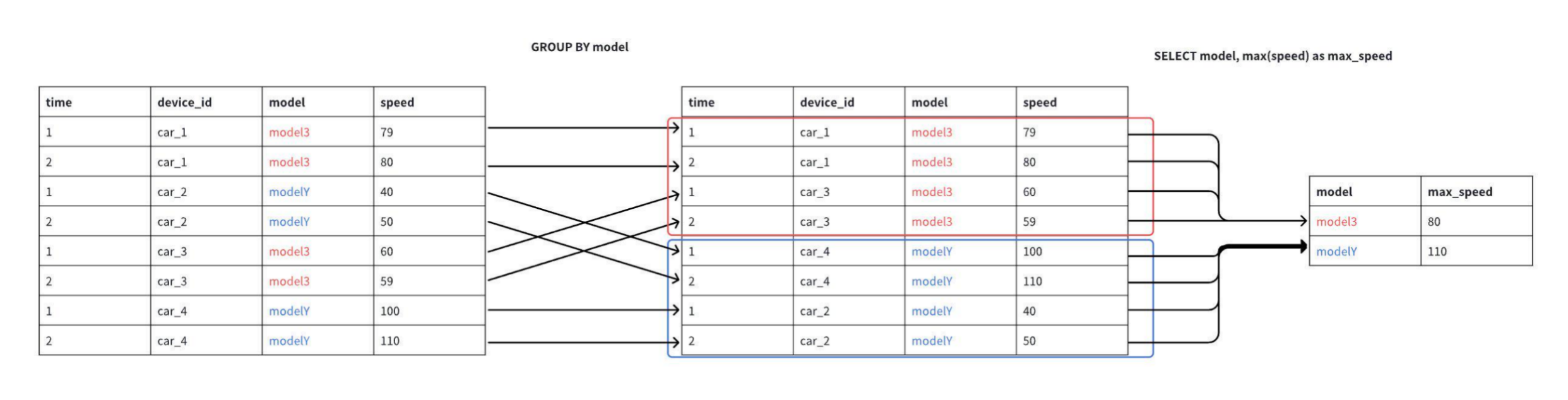
GROUP BY 子句用于将 SELECT 语句的结果集按指定的列值进行分组计算。这些分组列的值在结果中保持原样,其他列中具备相同分组列值的所有记录通过指定的聚合函数(例如 COUNT、AVG)进行计算。
2. 注意事项
在 SELECT 子句中的项必须包含聚合函数或由出现在 GROUP BY 子句中的列组成。
合法示例:
SELECT concat(device_id, model_id), avg(temperature)
  FROM table1
  GROUP BY device_id, model_id; -- 合法
执行结果如下:
+-----+-----+
|_col0|_col1|
+-----+-----+
| 100A| 90.0|
| 100C| 86.0|
| 100E| 90.0|
| 101B| 85.0|
| 101D| 85.0|
| 101F| 90.0|
+-----+-----+
Total line number = 6
It costs 0.094s
不合法示例1:
SELECT device_id, temperature
  FROM table1
  GROUP BY device_id;-- 不合法
执行结果如下:
Msg: com.unvdb.udbds.UDBDSSQLException: 701:
  'temperature' must be an aggregate expression or appear in GROUP BY clause
不合法示例2:
SELECT device_id, avg(temperature)
  FROM table1
  GROUP BY model; -- 不合法
执行结果如下:
Msg: com.unvdb.udbds.UDBDSSQLException: 701:
  Column 'model' cannot be resolved
如果没有 GROUP BY 子句,则 SELECT 子句中的所有项要么都包含聚合函数,要么都不包含聚合函数。
合法示例:
SELECT COUNT(*), avg(temperature)
  FROM table1; -- 合法
执行结果如下:
+-----+-----------------+
|_col0|            _col1|
+-----+-----------------+
|   18|87.33333333333333|
+-----+-----------------+
Total line number = 1
It costs 0.094s
不合法示例:
SELECT humidity, avg(temperature) FROM table1; -- 不合法
执行结果如下:
Msg: com.unvdb.udbds.UDBDSSQLException: 701:
  'humidity' must be an aggregate expression or appear in GROUP BY clause
group by子句可以使用从 1 开始的常量整数来引用 SELECT 子句中的项,如果常量整数小于1或大于选择项列表的大小,则会抛出错误。
SELECT date_bin(1h, time), device_id, avg(temperature)
  FROM table1
  WHERE time >= 2024-11-27 00:00:00  and time <= 2024-11-29 00:00:00
  GROUP BY 1, device_id;
执行结果如下:
+-----------------------------+---------+-----+
|                        _col0|device_id|_col2|
+-----------------------------+---------+-----+
|2024-11-28T08:00:00.000+08:00|      100| 85.0|
|2024-11-28T09:00:00.000+08:00|      100| null|
|2024-11-28T10:00:00.000+08:00|      100| 85.0|
|2024-11-28T11:00:00.000+08:00|      100| 88.0|
|2024-11-27T16:00:00.000+08:00|      101| 85.0|
+-----------------------------+---------+-----+
Total line number = 5
It costs 0.092s
不支持在 group by 子句中使用 select item 的别名。以下 SQL 将抛出错误,可以使用上述 SQL 代替。
SELECT date_bin(1h, time) AS hour_time, device_id, avg(temperature)
  FROM table1
  WHERE time >= 2024-11-27 00:00:00  and time <= 2024-11-29 00:00:00
  GROUP BY date_bin(1h, time), device_id;
执行结果如下:
+-----------------------------+---------+-----+
|                    hour_time|device_id|_col2|
+-----------------------------+---------+-----+
|2024-11-28T08:00:00.000+08:00|      100| 85.0|
|2024-11-28T09:00:00.000+08:00|      100| null|
|2024-11-28T10:00:00.000+08:00|      100| 85.0|
|2024-11-28T11:00:00.000+08:00|      100| 88.0|
|2024-11-27T16:00:00.000+08:00|      101| 85.0|
+-----------------------------+---------+-----+
Total line number = 5
It costs 0.092s
只有 COUNT 函数可以与星号(*)一起使用,用于计算表中的总行数。其他聚合函数与
*一起使用,将抛出错误。
SELECT count(*) FROM table1;
执行结果如下:
+-----+
|_col0|
+-----+
|   18|
+-----+
Total line number = 1
It costs 0.047s
3. 示例数据
在示例数据页面中,包含了用于构建表结构和插入数据的SQL语句,下载并在UDB-DS CLI中执行这些语句,即可将数据导入UDB-DS,您可以使用这些数据来测试和执行示例中的SQL语句,并获得相应的结果。
示例 1:降采样时间序列数据
对设备 101 下述时间范围的温度进行降采样,每小时返回一个平均温度。
SELECT date_bin(1h, time) AS hour_time, AVG(temperature) AS avg_temperature
  FROM table1
  WHERE time >= 2024-11-27 00:00:00  and time <= 2024-11-30 00:00:00
  AND device_id='101'
  GROUP BY 1;
执行结果如下:
+-----------------------------+---------------+
|                    hour_time|avg_temperature|
+-----------------------------+---------------+
|2024-11-29T10:00:00.000+08:00|           85.0|
|2024-11-27T16:00:00.000+08:00|           85.0|
+-----------------------------+---------------+
Total line number = 2
It costs 0.054s
对每个设备过去一天的温度进行降采样,每小时返回一个平均温度。
SELECT date_bin(1h, time) AS hour_time, device_id, AVG(temperature) AS avg_temperature
  FROM table1
  WHERE time >= 2024-11-27 00:00:00  and time <= 2024-11-30 00:00:00
  GROUP BY 1, device_id;
执行结果如下:
+-----------------------------+---------+---------------+
|                    hour_time|device_id|avg_temperature|
+-----------------------------+---------+---------------+
|2024-11-29T11:00:00.000+08:00|      100|           null|
|2024-11-29T18:00:00.000+08:00|      100|           90.0|
|2024-11-28T08:00:00.000+08:00|      100|           85.0|
|2024-11-28T09:00:00.000+08:00|      100|           null|
|2024-11-28T10:00:00.000+08:00|      100|           85.0|
|2024-11-28T11:00:00.000+08:00|      100|           88.0|
|2024-11-29T10:00:00.000+08:00|      101|           85.0|
|2024-11-27T16:00:00.000+08:00|      101|           85.0|
+-----------------------------+---------+---------------+
Total line number = 8
It costs 0.081s
有关date_bin函数的更多详细信息可以参见: date_bin (时间分桶规整)函数功能定义
示例 2:查询每个设备的最新数据点
SELECT device_id, LAST(temperature), LAST_BY(time, temperature)
  FROM table1
  GROUP BY device_id;
执行结果如下:
+---------+-----+-----------------------------+
|device_id|_col1|                        _col2|
+---------+-----+-----------------------------+
|      100| 90.0|2024-11-29T18:30:00.000+08:00|
|      101| 90.0|2024-11-30T14:30:00.000+08:00|
+---------+-----+-----------------------------+
Total line number = 2
It costs 0.078s
示例 3:计算总行数
计算所有设备的总行数:
SELECT COUNT(*) FROM table1;
执行结果如下:
+-----+
|_col0|
+-----+
|   18|
+-----+
Total line number = 1
It costs 0.060s
计算每个设备的总行数:
SELECT device_id, COUNT(*) AS total_rows
  FROM table1
  GROUP BY device_id;
执行结果如下:
+---------+----------+
|device_id|total_rows|
+---------+----------+
|      100|         8|
|      101|        10|
+---------+----------+
Total line number = 2
It costs 0.060s
示例 4:没有 group by 子句的聚合
查询所有设备中的最大温度:
SELECT MAX(temperature)
FROM table1;
执行结果如下:
+-----+
|_col0|
+-----+
| 90.0|
+-----+
Total line number = 1
It costs 0.086s
示例 5:对子查询的结果进行聚合
查询在指定时间段内平均温度超过 80.0 且至少有两次记录的设备和工厂组合:
SELECT plant_id, device_id
FROM (
    SELECT date_bin(10m, time) AS time, plant_id, device_id, AVG(temperature) AS temp FROM table1 WHERE time >= 2024-11-26 00:00:00 AND time <= 2024-11-29 00:00:00
    GROUP BY 1, plant_id, device_id
)
WHERE temp > 80.0
GROUP BY plant_id, device_id
HAVING COUNT(*) > 1;
执行结果如下:
+--------+---------+
|plant_id|device_id|
+--------+---------+
|    1001|      101|
|    3001|      100|
+--------+---------+
Total line number = 2
It costs 0.073s
HAVING 子句
1. 语法概览
HAVING booleanExpression
1.1 HAVING 子句
用于在数据分组聚合(GROUP BY)完成后,对聚合结果进行筛选。
注意事项
就语法而言,
HAVING子句与WHERE子句相同,WHERE子句在分组聚合之前对数据进行过滤,HAVING子句是对分组聚合后的结果进行过滤。
2. 示例数据
在示例数据页面中,包含了用于构建表结构和插入数据的SQL语句,下载并在UDB-DS CLI中执行这些语句,即可将数据导入UDB-DS,您可以使用这些数据来测试和执行示例中的SQL语句,并获得相应的结果。
2.1 示例 1:过滤计数低于特定值的设备
查询将计算 table1 表中每个 device_id 的条目数,并过滤掉那些计数低于 5 的设备。
SELECT device_id, COUNT(*)
  FROM table1
  GROUP BY device_id
  HAVING COUNT(*) >= 5;
执行结果如下:
+---------+-----+
|device_id|_col1|
+---------+-----+
|      100|    8|
|      101|   10|
+---------+-----+
Total line number = 2
It costs 0.063s
2.2 示例 2:计算每个设备的每小时平均温度并过滤
查询将计算 table1 表中每个设备每小时的平均温度,并过滤掉那些平均温度低于 27.2 的设备。
SELECT date_bin(1h, time) as hour_time, device_id, AVG(temperature) as avg_temp
  FROM table1
  GROUP BY date_bin(1h, time), device_id
  HAVING AVG(temperature) >= 85.0;
执行结果如下:
+-----------------------------+---------+--------+
|                    hour_time|device_id|avg_temp|
+-----------------------------+---------+--------+
|2024-11-29T18:00:00.000+08:00|      100|    90.0|
|2024-11-28T08:00:00.000+08:00|      100|    85.0|
|2024-11-28T10:00:00.000+08:00|      100|    85.0|
|2024-11-28T11:00:00.000+08:00|      100|    88.0|
|2024-11-26T13:00:00.000+08:00|      100|    90.0|
|2024-11-30T09:00:00.000+08:00|      101|    90.0|
|2024-11-30T14:00:00.000+08:00|      101|    90.0|
|2024-11-29T10:00:00.000+08:00|      101|    85.0|
|2024-11-27T16:00:00.000+08:00|      101|    85.0|
+-----------------------------+---------+--------+
Total line number = 9
It costs 0.079s
FILL 子句
1. 功能介绍
在执行数据查询时,可能会遇到某些列在某些行中没有数据,导致结果集中出现 NULL 值。这些 NULL 值不利于数据的可视化展示和分析,因此 UDB-DS 提供了 FILL 子句来填充这些 NULL 值。
当查询中包含 ORDER BY 子句时,FILL 子句会在 ORDER BY 之前执行。而如果存在 GAPFILL( date_bin_gapfill 函数)操作,则 FILL 子句会在 GAPFILL 之后执行。
2. 语法概览
fillClause
    : FILL METHOD fillMethod
    ;

fillMethod
    : LINEAR timeColumnClause? fillGroupClause?                           #linearFill
    | PREVIOUS timeBoundClause? timeColumnClause? fillGroupClause?        #previousFill
    | CONSTANT literalExpression                                          #valueFill
    ;

timeColumnClause
    : TIME_COLUMN INTEGER_VALUE
    ;

fillGroupClause
    : FILL_GROUP INTEGER_VALUE (',' INTEGER_VALUE)*
    ;

timeBoundClause
    : TIME_BOUND duration=timeDuration
    ;

timeDuration
    : (INTEGER_VALUE intervalField)+
    ;
intervalField
    : YEAR | MONTH | WEEK | DAY | HOUR | MINUTE | SECOND | MILLISECOND | MICROSECOND | NANOSECOND
    ;
2.1 填充方式
UDB-DS 支持以下三种空值填充方式:
PREVIOUS填充:使用该列前一个非空值进行填充。LINEAR填充:使用该列前一个非空值和下一个非空值的线性插值进行填充。Constant填充:使用指定的常量值进行填充。
只能指定一种填充方法,且该方法会作用于结果集的全部列。
2.2 数据类型与支持的填充方法
| Data Type | Previous | Linear | Constant |
|---|---|---|---|
| boolean | √ | - | √ |
| int32 | √ | √ | √ |
| int64 | √ | √ | √ |
| float | √ | √ | √ |
| double | √ | √ | √ |
| text | √ | - | √ |
| string | √ | - | √ |
| blob | √ | - | √ |
| timestamp | √ | √ | √ |
| date | √ | √ | √ |
注意:对于数据类型不支持指定填充方法的列,既不进行填充,也不抛出异常,只是保持原样。
3. 示例数据
在示例数据页面中,包含了用于构建表结构和插入数据的SQL语句,下载并在UDB-DS CLI中执行这些语句,即可将数据导入UDB-DS,您可以使用这些数据来测试和执行示例中的SQL语句,并获得相应的结果。
3.1 PREVIOUS 填充:
对于查询结果集中的空值,使用该列的前一个非空值进行填充。
3.1.1 参数介绍:
TIME_BOUND(可选):向前查看的时间阈值。如果当前空值的时间戳与前一个非空值的时间戳之间的间隔超过了此阈值,则不会进行填充。默认选择查询结果中第一个 TIMESTAMP 类型的列来确定是否超出了时间阈值。
时间阈值参数格式为时间间隔,数值部分需要为整数,单位部分 y 表示年,mo 表示月,w 表示周,d 表示天,h 表示小时,m 表示分钟,s 表示秒,ms 表示毫秒,µs 表示微秒,ns 表示纳秒,如1d1h。
TIME_COLUMN(可选):若需手动指定用于判断时间阈值的 TIMESTAMP 列,可通过在
TIME_COLUMN参数后指定数字(从1开始)来确定列的顺序位置,该数字代表在原始表中 TIMESTAMP 列的具体位置。
3.1.2 示例
不使用任何填充方法:
SELECT time, temperature, status
  FROM table1
  WHERE time >= 2024-11-27 00:00:00  and time <= 2024-11-29 00:00:00
    AND plant_id='1001' and device_id='101';
查询结果:
+-----------------------------+-----------+------+
|                         time|temperature|status|
+-----------------------------+-----------+------+
|2024-11-27T16:38:00.000+08:00|       null|  true|
|2024-11-27T16:39:00.000+08:00|       85.0|  null|
|2024-11-27T16:40:00.000+08:00|       85.0|  null|
|2024-11-27T16:41:00.000+08:00|       85.0|  null|
|2024-11-27T16:42:00.000+08:00|       null| false|
|2024-11-27T16:43:00.000+08:00|       null| false|
|2024-11-27T16:44:00.000+08:00|       null| false|
+-----------------------------+-----------+------+
Total line number = 7
It costs 0.088s
使用 PREVIOUS 填充方法(结果将使用前一个非空值填充 NULL 值):
SELECT time, temperature, status
  FROM table1
  WHERE time >= 2024-11-27 00:00:00  and time <= 2024-11-29 00:00:00
    AND plant_id='1001' and device_id='101'
  FILL METHOD PREVIOUS;
查询结果:
+-----------------------------+-----------+------+
|                         time|temperature|status|
+-----------------------------+-----------+------+
|2024-11-27T16:38:00.000+08:00|       null|  true|
|2024-11-27T16:39:00.000+08:00|       85.0|  true|
|2024-11-27T16:40:00.000+08:00|       85.0|  true|
|2024-11-27T16:41:00.000+08:00|       85.0|  true|
|2024-11-27T16:42:00.000+08:00|       85.0| false|
|2024-11-27T16:43:00.000+08:00|       85.0| false|
|2024-11-27T16:44:00.000+08:00|       85.0| false|
+-----------------------------+-----------+------+
Total line number = 7
It costs 0.091s
使用 PREVIOUS 填充方法(指定时间阈值):
-- 不指定时间列
SELECT time, temperature, status
  FROM table1
  WHERE time >= 2024-11-27 00:00:00  and time <= 2024-11-29 00:00:00
      AND plant_id='1001' and device_id='101'
  FILL METHOD PREVIOUS TIME_BOUND 1m;

-- 手动指定时间列
SELECT time, temperature, status
  FROM table1
  WHERE time >= 2024-11-27 00:00:00  and time <= 2024-11-29 00:00:00
      AND plant_id='1001' and device_id='101'
  FILL METHOD PREVIOUS TIME_BOUND 1m TIME_COLUMN 1;
查询结果:
+-----------------------------+-----------+------+
|                         time|temperature|status|
+-----------------------------+-----------+------+
|2024-11-27T16:38:00.000+08:00|       null|  true|
|2024-11-27T16:39:00.000+08:00|       85.0|  true|
|2024-11-27T16:40:00.000+08:00|       85.0|  null|
|2024-11-27T16:41:00.000+08:00|       85.0|  null|
|2024-11-27T16:42:00.000+08:00|       85.0| false|
|2024-11-27T16:43:00.000+08:00|       null| false|
|2024-11-27T16:44:00.000+08:00|       null| false|
+-----------------------------+-----------+------+
Total line number = 7
It costs 0.075s
3.2 LINEAR 填充
对于查询结果集中的空值,用该列的前一个非空值和后一个非空值的线性插值填充。
3.2.1 线性填充规则:
如果之前都是空值,或者之后都是空值,则不进行填充。
如果列的数据类型是 boolean/string/blob/text,则不会进行填充,也不会抛出异常。
若没有指定时间列,默认选择 SELECT 子句中第一个数据类型为 TIMESTAMP 类型的列作为辅助时间列进行线性插值。如果不存在数据类型为TIMESTAMP的列,系统将抛出异常。
3.2.2 参数介绍:
TIME_COLUMN(可选):可以通过在
TIME_COLUMN参数后指定数字(从1开始)来手动指定用于判断时间阈值的TIMESTAMP列,作为线性插值的辅助列,该数字代表原始表中TIMESTAMP列的具体位置。
注意:不强制要求线性插值的辅助列一定是 time 列,任何类型为 TIMESTAMP 的表达式都可以,不过因为线性插值只有在辅助列是升序或者降序的时候,才有意义,所以用户如果指定了其他的列,需要自行保证结果集是按照那一列升序或降序排列的。
3.2.3 示例
SELECT time, temperature, status
  FROM table1
  WHERE time >= 2024-11-27 00:00:00  and time <= 2024-11-29 00:00:00
      AND plant_id='1001' and device_id='101'
  FILL METHOD LINEAR;
查询结果:
+-----------------------------+-----------+------+
|                         time|temperature|status|
+-----------------------------+-----------+------+
|2024-11-27T16:38:00.000+08:00|       null|  true|
|2024-11-27T16:39:00.000+08:00|       85.0|  null|
|2024-11-27T16:40:00.000+08:00|       85.0|  null|
|2024-11-27T16:41:00.000+08:00|       85.0|  null|
|2024-11-27T16:42:00.000+08:00|       null| false|
|2024-11-27T16:43:00.000+08:00|       null| false|
|2024-11-27T16:44:00.000+08:00|       null| false|
+-----------------------------+-----------+------+
Total line number = 7
It costs 0.053s
3.3 Constant 填充:
对于查询结果集中的空值,使用指定的常量进行填充。
3.3.1 常量填充规则:
若数据类型与输入的常量不匹配,UDB-DS 不会填充查询结果,也不会抛出异常。
若插入的常量值超出了其数据类型所能表示的最大值,UDB-DS 不会填充查询结果,也不会抛出异常。
3.3.2 示例
使用FLOAT常量填充时,SQL 语句如下所示:
SELECT time, temperature, status
  FROM table1
  WHERE time >= 2024-11-27 00:00:00  and time <= 2024-11-29 00:00:00
      AND plant_id='1001' and device_id='101'
  FILL METHOD CONSTANT 80.0;
查询结果:
+-----------------------------+-----------+------+
|                         time|temperature|status|
+-----------------------------+-----------+------+
|2024-11-27T16:38:00.000+08:00|       80.0|  true|
|2024-11-27T16:39:00.000+08:00|       85.0|  true|
|2024-11-27T16:40:00.000+08:00|       85.0|  true|
|2024-11-27T16:41:00.000+08:00|       85.0|  true|
|2024-11-27T16:42:00.000+08:00|       80.0| false|
|2024-11-27T16:43:00.000+08:00|       80.0| false|
|2024-11-27T16:44:00.000+08:00|       80.0| false|
+-----------------------------+-----------+------+
Total line number = 7
It costs 0.242s
使用BOOLEAN常量填充时,SQL 语句如下所示:
SELECT time, temperature, status
  FROM table1
  WHERE time >= 2024-11-27 00:00:00  and time <= 2024-11-29 00:00:00
      AND plant_id='1001' and device_id='101'
  FILL METHOD CONSTANT true;
查询结果:
+-----------------------------+-----------+------+
|                         time|temperature|status|
+-----------------------------+-----------+------+
|2024-11-27T16:38:00.000+08:00|        1.0|  true|
|2024-11-27T16:39:00.000+08:00|       85.0|  true|
|2024-11-27T16:40:00.000+08:00|       85.0|  true|
|2024-11-27T16:41:00.000+08:00|       85.0|  true|
|2024-11-27T16:42:00.000+08:00|        1.0| false|
|2024-11-27T16:43:00.000+08:00|        1.0| false|
|2024-11-27T16:44:00.000+08:00|        1.0| false|
+-----------------------------+-----------+------+
Total line number = 7
It costs 0.073s
4. 高阶用法
使用 PREVIOUS 和 LINEAR FILL 时,还支持额外的 FILL_GROUP 参数,来进行分组内填充。
在使用 group by 子句 + fill 时,想在分组内进行填充,而不受其他分组的影响。
例如:对每个 device_id 内部的空值进行填充,而不使用其他设备的值:
SELECT date_bin(1h, time) AS hour_time,  plant_id, device_id, avg(temperature) AS avg_temp
  FROM table1
  WHERE time >= 2024-11-28 08:00:00 AND time < 2024-11-30 14:30:00
  group by 1, plant_id, device_id;
查询结果:
+-----------------------------+--------+---------+--------+
|                    hour_time|plant_id|device_id|avg_temp|
+-----------------------------+--------+---------+--------+
|2024-11-28T08:00:00.000+08:00|    3001|      100|    85.0|
|2024-11-28T09:00:00.000+08:00|    3001|      100|    null|
|2024-11-28T10:00:00.000+08:00|    3001|      100|    85.0|
|2024-11-28T11:00:00.000+08:00|    3001|      100|    88.0|
|2024-11-29T10:00:00.000+08:00|    3001|      101|    85.0|
|2024-11-29T11:00:00.000+08:00|    3002|      100|    null|
|2024-11-29T18:00:00.000+08:00|    3002|      100|    90.0|
|2024-11-30T09:00:00.000+08:00|    3002|      101|    90.0|
+-----------------------------+--------+---------+--------+
Total line number = 8
It costs 0.110s
若没有指定 FILL_GROUP 参数时,100 的空值会被 101 的值填充:
SELECT date_bin(1h, time) AS hour_time,  plant_id, device_id, avg(temperature) AS avg_temp
  FROM table1
  WHERE time >= 2024-11-28 08:00:00 AND time < 2024-11-30 14:30:00
  group by 1, plant_id, device_id
  FILL METHOD PREVIOUS;
查询结果:
+-----------------------------+--------+---------+--------+
|                    hour_time|plant_id|device_id|avg_temp|
+-----------------------------+--------+---------+--------+
|2024-11-28T08:00:00.000+08:00|    3001|      100|    85.0|
|2024-11-28T09:00:00.000+08:00|    3001|      100|    85.0|
|2024-11-28T10:00:00.000+08:00|    3001|      100|    85.0|
|2024-11-28T11:00:00.000+08:00|    3001|      100|    88.0|
|2024-11-29T10:00:00.000+08:00|    3001|      101|    85.0|
|2024-11-29T11:00:00.000+08:00|    3002|      100|    85.0|
|2024-11-29T18:00:00.000+08:00|    3002|      100|    90.0|
|2024-11-30T09:00:00.000+08:00|    3002|      101|    90.0|
+-----------------------------+--------+---------+--------+
Total line number = 8
It costs 0.066s
指定了 FILL_GROUP 为第 2 列后,填充只会发生在以第二列device_id为分组键的分组中,100 的空值不会被 101 的值填充,因为它们属于不同的分组。
SELECT date_bin(1h, time) AS hour_time,  plant_id, device_id, avg(temperature) AS avg_temp
  FROM table1
  WHERE time >= 2024-11-28 08:00:00 AND time < 2024-11-30 14:30:00
  group by 1, plant_id, device_id
  FILL METHOD PREVIOUS FILL_GROUP 2;
查询结果:
+-----------------------------+--------+---------+--------+
|                    hour_time|plant_id|device_id|avg_temp|
+-----------------------------+--------+---------+--------+
|2024-11-28T08:00:00.000+08:00|    3001|      100|    85.0|
|2024-11-28T09:00:00.000+08:00|    3001|      100|    85.0|
|2024-11-28T10:00:00.000+08:00|    3001|      100|    85.0|
|2024-11-28T11:00:00.000+08:00|    3001|      100|    88.0|
|2024-11-29T10:00:00.000+08:00|    3001|      101|    85.0|
|2024-11-29T11:00:00.000+08:00|    3002|      100|    null|
|2024-11-29T18:00:00.000+08:00|    3002|      100|    90.0|
|2024-11-30T09:00:00.000+08:00|    3002|      101|    90.0|
+-----------------------------+--------+---------+--------+
Total line number = 8
It costs 0.089s
5. 特别说明
在使用 LINEAR FILL 或 PREVIOUS FILL 时,如果辅助时间列(用于确定填充逻辑的时间列)中存在 NULL 值,UDB-DS 将遵循以下规则:
不对辅助时间列为 NULL 的行进行填充。
这些行也不会参与到填充逻辑的计算中。
以 PREVIOUS FILL为例,原始数据如下所示:
SELECT time, plant_id, device_id, humidity, arrival_time
  FROM table1
  WHERE time >= 2024-11-26 16:37:00 and time <= 2024-11-28 08:00:00
      AND plant_id='1001' and device_id='101';
查询结果:
+-----------------------------+--------+---------+--------+-----------------------------+
|                         time|plant_id|device_id|humidity|                 arrival_time|
+-----------------------------+--------+---------+--------+-----------------------------+
|2024-11-27T16:38:00.000+08:00|    1001|      101|    35.1|2024-11-27T16:37:01.000+08:00|
|2024-11-27T16:39:00.000+08:00|    1001|      101|    35.3|                         null|
|2024-11-27T16:40:00.000+08:00|    1001|      101|    null|2024-11-27T16:37:03.000+08:00|
|2024-11-27T16:41:00.000+08:00|    1001|      101|    null|2024-11-27T16:37:04.000+08:00|
|2024-11-27T16:42:00.000+08:00|    1001|      101|    35.2|                         null|
|2024-11-27T16:43:00.000+08:00|    1001|      101|    null|                         null|
|2024-11-27T16:44:00.000+08:00|    1001|      101|    null|2024-11-27T16:37:08.000+08:00|
+-----------------------------+--------+---------+--------+-----------------------------+
Total line number = 7
It costs 0.119s
使用 arrival_time 列作为辅助时间列,并设置时间间隔(TIME_BOUND)为 2 ms(前值距离当前值超过 2ms 就不填充):
SELECT time, plant_id, device_id, humidity, arrival_time
  FROM table1
  WHERE time >= 2024-11-26 16:37:00 and time <= 2024-11-28 08:00:00
    AND plant_id='1001' and device_id='101'
  FILL METHOD PREVIOUS TIME_BOUND 2s TIME_COLUMN 5;
查询结果:
+-----------------------------+--------+---------+--------+-----------------------------+
|                         time|plant_id|device_id|humidity|                 arrival_time|
+-----------------------------+--------+---------+--------+-----------------------------+
|2024-11-27T16:38:00.000+08:00|    1001|      101|    35.1|2024-11-27T16:37:01.000+08:00|
|2024-11-27T16:39:00.000+08:00|    1001|      101|    35.3|                         null|
|2024-11-27T16:40:00.000+08:00|    1001|      101|    35.1|2024-11-27T16:37:03.000+08:00|
|2024-11-27T16:41:00.000+08:00|    1001|      101|    null|2024-11-27T16:37:04.000+08:00|
|2024-11-27T16:42:00.000+08:00|    1001|      101|    35.2|                         null|
|2024-11-27T16:43:00.000+08:00|    1001|      101|    null|                         null|
|2024-11-27T16:44:00.000+08:00|    1001|      101|    null|2024-11-27T16:37:08.000+08:00|
+-----------------------------+--------+---------+--------+-----------------------------+
Total line number = 7
It costs 0.049s
填充结果详情:
16:39、16:42、16:43 的 humidity 列,由于辅助列 arrival_time 为 NULL,所以不进行填充。
16:40 的 humidity 列,由于辅助列 arrival_time 非 NULL ,为
1970-01-01T08:00:00.003+08:00且与前一个非 NULL 值1970-01-01T08:00:00.001+08:00的时间差未超过 2ms,因此使用第一行 s1 的值 1 进行填充。16:41 的 humidity 列,尽管 arrival_time 非 NULL,但与前一个非 NULL 值的时间差超过 2ms,因此不进行填充。第七行同理。
ORDER BY 子句
1. 语法概览
ORDER BY sortItem (',' sortItem)*

sortItem
    : expression (ASC | DESC)? (NULLS (FIRST | LAST))?
    ;
1.1 ORDER BY 子句
用于在查询的最后阶段对结果集进行排序,能够根据指定的排序条件,将查询结果中的行按照升序(ASC)或降序(DESC)进行排列。
提供了对 NULL 值排序位置的控制,允许用户指定 NULL 值是排在结果的开头(NULLS FIRST)还是结尾(NULLS LAST)。
默认情况下, 将采用 ASC NULLS LAST排序,即值按升序排序,空值放在最后。可以通过手动指定其他参数更改默认排序顺序。
ORDER BY 子句的执行顺序排在 LIMIT 或 OFFSET 子句之前。
2. 示例数据
在示例数据页面中,包含了用于构建表结构和插入数据的SQL语句,下载并在UDB-DS CLI中执行这些语句,即可将数据导入UDB-DS,您可以使用这些数据来测试和执行示例中的SQL语句,并获得相应的结果。
示例 1: 按时间降序查询过去一小时的数据
SELECT *
  FROM table1
  WHERE time >= 2024-11-27 00:00:00  and time <= 2024-11-29 00:00:00
  ORDER BY time DESC;
执行结果如下:
+-----------------------------+------+--------+---------+--------+-----------+-----------+--------+------+-----------------------------+
|                         time|region|plant_id|device_id|model_id|maintenance|temperature|humidity|status|                   modifytime|
+-----------------------------+------+--------+---------+--------+-----------+-----------+--------+------+-----------------------------+
|2024-11-28T11:00:00.000+08:00|  上海|    3001|      100|       C|         90|       88.0|    45.1|  true|2024-11-28T11:00:12.000+08:00|
|2024-11-28T10:00:00.000+08:00|  上海|    3001|      100|       C|         90|       85.0|    35.2|  null|2024-11-28T10:00:11.000+08:00|
|2024-11-28T09:00:00.000+08:00|  上海|    3001|      100|       C|         90|       null|    40.9|  true|                         null|
|2024-11-28T08:00:00.000+08:00|  上海|    3001|      100|       C|         90|       85.0|    null|  null|2024-11-28T08:00:09.000+08:00|
|2024-11-27T16:44:00.000+08:00|  北京|    1001|      101|       B|        180|       null|    null| false|2024-11-26T16:37:08.000+08:00|
|2024-11-27T16:43:00.000+08:00|  北京|    1001|      101|       B|        180|       null|    null| false|                         null|
|2024-11-27T16:42:00.000+08:00|  北京|    1001|      101|       B|        180|       null|    35.2| false|                         null|
|2024-11-27T16:41:00.000+08:00|  北京|    1001|      101|       B|        180|       85.0|    null|  null|2024-11-26T16:37:04.000+08:00|
|2024-11-27T16:40:00.000+08:00|  北京|    1001|      101|       B|        180|       85.0|    null|  null|2024-11-26T16:37:03.000+08:00|
|2024-11-27T16:39:00.000+08:00|  北京|    1001|      101|       B|        180|       85.0|    35.3|  null|                         null|
|2024-11-27T16:38:00.000+08:00|  北京|    1001|      101|       B|        180|       null|    35.1|  true|2024-11-26T16:37:01.000+08:00|
+-----------------------------+------+--------+---------+--------+-----------+-----------+--------+------+-----------------------------+
Total line number = 11
It costs 0.148s
示例 2: 按 device_id 升序和时间降序查询所有设备过去一小时的数据,空 temperature 优先显示
SELECT *
  FROM table1
  WHERE time >= 2024-11-27 00:00:00  and time <= 2024-11-29 00:00:00
  ORDER BY temperature NULLS FIRST, time DESC;
执行结果如下:
+-----------------------------+------+--------+---------+--------+-----------+-----------+--------+------+-----------------------------+
|                         time|region|plant_id|device_id|model_id|maintenance|temperature|humidity|status|                   modifytime|
+-----------------------------+------+--------+---------+--------+-----------+-----------+--------+------+-----------------------------+
|2024-11-28T09:00:00.000+08:00|  上海|    3001|      100|       C|         90|       null|    40.9|  true|                         null|
|2024-11-27T16:44:00.000+08:00|  北京|    1001|      101|       B|        180|       null|    null| false|2024-11-26T16:37:08.000+08:00|
|2024-11-27T16:43:00.000+08:00|  北京|    1001|      101|       B|        180|       null|    null| false|                         null|
|2024-11-27T16:42:00.000+08:00|  北京|    1001|      101|       B|        180|       null|    35.2| false|                         null|
|2024-11-27T16:38:00.000+08:00|  北京|    1001|      101|       B|        180|       null|    35.1|  true|2024-11-26T16:37:01.000+08:00|
|2024-11-28T10:00:00.000+08:00|  上海|    3001|      100|       C|         90|       85.0|    35.2|  null|2024-11-28T10:00:11.000+08:00|
|2024-11-28T08:00:00.000+08:00|  上海|    3001|      100|       C|         90|       85.0|    null|  null|2024-11-28T08:00:09.000+08:00|
|2024-11-27T16:41:00.000+08:00|  北京|    1001|      101|       B|        180|       85.0|    null|  null|2024-11-26T16:37:04.000+08:00|
|2024-11-27T16:40:00.000+08:00|  北京|    1001|      101|       B|        180|       85.0|    null|  null|2024-11-26T16:37:03.000+08:00|
|2024-11-27T16:39:00.000+08:00|  北京|    1001|      101|       B|        180|       85.0|    35.3|  null|                         null|
|2024-11-28T11:00:00.000+08:00|  上海|    3001|      100|       C|         90|       88.0|    45.1|  true|2024-11-28T11:00:12.000+08:00|
+-----------------------------+------+--------+---------+--------+-----------+-----------+--------+------+-----------------------------+
Total line number = 11
It costs 0.060s
示例 3: 查询温度最高的前10行数据
SELECT *
  FROM table1
  ORDER BY temperature DESC NULLS LAST
  LIMIT 10;
执行结果如下:
+-----------------------------+------+--------+---------+--------+-----------+-----------+--------+------+-----------------------------+
|                         time|region|plant_id|device_id|model_id|maintenance|temperature|humidity|status|                   modifytime|
+-----------------------------+------+--------+---------+--------+-----------+-----------+--------+------+-----------------------------+
|2024-11-30T09:30:00.000+08:00|  上海|    3002|      101|       F|        360|       90.0|    35.2|  true|                         null|
|2024-11-26T13:38:00.000+08:00|  北京|    1001|      100|       A|        180|       90.0|    35.1|  true|2024-11-26T13:38:25.000+08:00|
|2024-11-30T14:30:00.000+08:00|  上海|    3002|      101|       F|        360|       90.0|    34.8|  true|2024-11-30T14:30:17.000+08:00|
|2024-11-26T13:37:00.000+08:00|  北京|    1001|      100|       A|        180|       90.0|    35.1|  true|2024-11-26T13:37:34.000+08:00|
|2024-11-29T18:30:00.000+08:00|  上海|    3002|      100|       E|        180|       90.0|    35.4|  true|2024-11-29T18:30:15.000+08:00|
|2024-11-28T11:00:00.000+08:00|  上海|    3001|      100|       C|         90|       88.0|    45.1|  true|2024-11-28T11:00:12.000+08:00|
|2024-11-28T10:00:00.000+08:00|  上海|    3001|      100|       C|         90|       85.0|    35.2|  null|2024-11-28T10:00:11.000+08:00|
|2024-11-28T08:00:00.000+08:00|  上海|    3001|      100|       C|         90|       85.0|    null|  null|2024-11-28T08:00:09.000+08:00|
|2024-11-29T10:00:00.000+08:00|  上海|    3001|      101|       D|        360|       85.0|    null|  null|2024-11-29T10:00:13.000+08:00|
|2024-11-27T16:40:00.000+08:00|  北京|    1001|      101|       B|        180|       85.0|    null|  null|2024-11-26T16:37:03.000+08:00|
+-----------------------------+------+--------+---------+--------+-----------+-----------+--------+------+-----------------------------+
Total line number = 10
It costs 0.069s
LIMIT 和 OFFSET 子句
1. 语法概览
OFFSET INTEGER_VALUE LIMIT INTEGER_VALUE
1.1 LIMIT 子句
LIMIT 子句应用在查询的最后阶段,用于限制返回的行数。
注意事项
在没有 ORDER BY 子句的情况下使用 LIMIT,查询结果的顺序可能是不确定的。
LIMIT 子句必须使用非负整数。
1.2 OFFSET 子句
OFFSET 子句与 LIMIT 子句配合使用,用于指定查询结果跳过前 OFFSET 行,以实现分页或特定位置的数据检索。
注意事项
OFFSET 子句必须接一个非负整数。
如果总记录数
n >= OFFSET+LIMIT之和,返回LIMIT数量的记录。如果总记录数
n < OFFSET+LIMIT之和,返回从OFFSET开始到末尾的所有记录,最多n-offset条。
2. 示例数据
在示例数据页面中,包含了用于构建表结构和插入数据的SQL语句,下载并在UDB-DS CLI中执行这些语句,即可将数据导入UDB-DS,您可以使用这些数据来测试和执行示例中的SQL语句,并获得相应的结果。
示例 1:查询设备的最新行
SELECT *
  FROM table1
  ORDER BY time DESC
  LIMIT 1;
执行结果如下:
+-----------------------------+------+--------+---------+--------+-----------+-----------+--------+------+-----------------------------+
|                         time|region|plant_id|device_id|model_id|maintenance|temperature|humidity|status|                   modifytime|
+-----------------------------+------+--------+---------+--------+-----------+-----------+--------+------+-----------------------------+
|2024-11-30T14:30:00.000+08:00|  上海|    3002|      101|       F|        360|       90.0|    34.8|  true|2024-11-30T14:30:17.000+08:00|
+-----------------------------+------+--------+---------+--------+-----------+-----------+--------+------+-----------------------------+
Total line number = 1
It costs 0.103s
示例 2:查询温度最高的前10行数据
SELECT *
  FROM table1
  ORDER BY temperature DESC NULLS LAST
  LIMIT 10;
执行结果如下:
+-----------------------------+------+--------+---------+--------+-----------+-----------+--------+------+-----------------------------+
|                         time|region|plant_id|device_id|model_id|maintenance|temperature|humidity|status|                   modifytime|
+-----------------------------+------+--------+---------+--------+-----------+-----------+--------+------+-----------------------------+
|2024-11-30T09:30:00.000+08:00|  上海|    3002|      101|       F|        360|       90.0|    35.2|  true|                         null|
|2024-11-26T13:38:00.000+08:00|  北京|    1001|      100|       A|        180|       90.0|    35.1|  true|2024-11-26T13:38:25.000+08:00|
|2024-11-30T14:30:00.000+08:00|  上海|    3002|      101|       F|        360|       90.0|    34.8|  true|2024-11-30T14:30:17.000+08:00|
|2024-11-26T13:37:00.000+08:00|  北京|    1001|      100|       A|        180|       90.0|    35.1|  true|2024-11-26T13:37:34.000+08:00|
|2024-11-29T18:30:00.000+08:00|  上海|    3002|      100|       E|        180|       90.0|    35.4|  true|2024-11-29T18:30:15.000+08:00|
|2024-11-28T11:00:00.000+08:00|  上海|    3001|      100|       C|         90|       88.0|    45.1|  true|2024-11-28T11:00:12.000+08:00|
|2024-11-28T10:00:00.000+08:00|  上海|    3001|      100|       C|         90|       85.0|    35.2|  null|2024-11-28T10:00:11.000+08:00|
|2024-11-28T08:00:00.000+08:00|  上海|    3001|      100|       C|         90|       85.0|    null|  null|2024-11-28T08:00:09.000+08:00|
|2024-11-29T10:00:00.000+08:00|  上海|    3001|      101|       D|        360|       85.0|    null|  null|2024-11-29T10:00:13.000+08:00|
|2024-11-27T16:40:00.000+08:00|  北京|    1001|      101|       B|        180|       85.0|    null|  null|2024-11-26T16:37:03.000+08:00|
+-----------------------------+------+--------+---------+--------+-----------+-----------+--------+------+-----------------------------+
Total line number = 10
It costs 0.063s
示例 3:从特定位置选择5行数据
SELECT *
  FROM table1
  ORDER BY TIME
  OFFSET 5
  LIMIT 5;
执行结果如下:
+-----------------------------+------+--------+---------+--------+-----------+-----------+--------+------+-----------------------------+
|                         time|region|plant_id|device_id|model_id|maintenance|temperature|humidity|status|                   modifytime|
+-----------------------------+------+--------+---------+--------+-----------+-----------+--------+------+-----------------------------+
|2024-11-27T16:41:00.000+08:00|  北京|    1001|      101|       B|        180|       85.0|    null|  null|2024-11-26T16:37:04.000+08:00|
|2024-11-27T16:42:00.000+08:00|  北京|    1001|      101|       B|        180|       null|    35.2| false|                         null|
|2024-11-27T16:43:00.000+08:00|  北京|    1001|      101|       B|        180|       null|    null| false|                         null|
|2024-11-27T16:44:00.000+08:00|  北京|    1001|      101|       B|        180|       null|    null| false|2024-11-26T16:37:08.000+08:00|
|2024-11-28T08:00:00.000+08:00|  上海|    3001|      100|       C|         90|       85.0|    null|  null|2024-11-28T08:00:09.000+08:00|
+-----------------------------+------+--------+---------+--------+-----------+-----------+--------+------+-----------------------------+
Total line number = 5
It costs 0.069s
嵌套查询
1. 概述
嵌套查询又被称为子查询,是指一个查询语句内部包含另一个或多个查询语句。嵌套查询由内层查询和外层查询组成。
2. 嵌套查询分类
嵌套查询可以按照以下两种依据进行分类:按是否引用外层查询分类、按结果集行列数分类。
按是否引用外层查询分类:
| 分类依据 | 嵌套查询类型 | 描述 | UDB-DS 支持情况 |
|---|---|---|---|
| 是否引用外层查询 | 非关联子查询 | 内层查询的执行和外层查询的执行是独立的,内层查询仅执行一次,执行完毕后将结果作为外层查询的条件使用。 | 支持 |
| 关联子查询 | 内层查询中使用到了外层查询的表中某些列,需要先执行外层查询,然后执行内层查询。 | 不支持 |
按照结果集行列数分类:
| 分类依据 | 子查询类型 | 描述 | 使用位置 | UDB-DS 支持情况 |
|---|---|---|---|---|
| 结果集行列数 | 标量子查询(Scalar Subquery) | 返回的结果集结构为一行一列。 | select、where、from、having | 支持 |
| 列子查询(Column Subquery) | 返回的结果集结构为 N 行一列。 | select、where、from、having | 支持 | |
| 行子查询(Row Subquery) | 返回的结果集结构为一行 N 列。 | - | 不支持 | |
| 表子查询(Table Subquery) | 返回的结果集结构为 N 行 M 列。 | from | 支持 |
3. 功能定义
所有内层查询都需要用圆括号()隔离,即以形如 (subquery) 的形式使用。
非关联子查询在内层查询中不支持引用外层查询中的列,若引用则会报错:
Msg: com.unvdb.udbds.UDBDSSQLException: 701: Given correlated subquery is not supported
3.1 非关联标量子查询
标量子查询返回的结果是一个标量值,可以用于替换表达式 expression 中的操作数。
语法
primaryExpression
: literalExpression --Literal
| dateExpression #dateTimeExpression --dateTimeExpression
| '(' expression (',' expression)+ ')' --rowConstructor
| ROW '(' expression (',' expression)* ')' --rowConstructor
| qualifiedName '(' (label=identifier '.')? ASTERISK ')' --functionCall
| qualifiedName '(' (setQuantifier? expression (',' expression)*)?')' --functionCall
| '(' query ')' --subqueryExpression
说明
标量子查询可以作为任意表达式(expression)的操作数,前提是这些输入参数在定义中未被强制规定为常量。
以下是一些不能使用标量子查询作为参数的例子:
date_bin(interval,source,origin)的第一、三个参数。date_bin_gapfill(interval,source,origin)的第一、三个参数。interval:时间间隔origin:起始时间戳
Fill参数fill previousfill linearfill constant
3.2 非关联列子查询
3.2.1 非关联 InPredicate
InPredicate 是一个 predicate,其返回值是一列 boolean 值。
语法
predicate[ParserRuleContext value]
: comparisonOperator right=valueExpression --comparison
| comparisonOperator comparisonQuantifier '(' query ')' --quantifiedComparison
| NOT? BETWEEN lower=valueExpression AND upper=valueExpression --between
| NOT? IN '(' expression (',' expression)* ')' --inList
| NOT? IN '(' query ')' --inSubquery
| NOT? LIKE pattern=valueExpression (ESCAPE escape=valueExpression)? --like
| IS NOT? NULL --nullPredicate
| IS NOT? DISTINCT FROM right=valueExpression --distinctFrom
;
说明
使用形式:X [NOT] IN (subquery)
X是一个表达式(expression)。NOT为可选,表示取反。subquery返回一个一列多行的结果集Result。对于
WHERE X IN (subquery),对于每一行X的结果,如果X在Result中,则SELECT中选取的当前行保留。
3.2.2 非关联 Quantified Comparison
Quantified Comparison 允许将一个值与一组值进行比较,通常由以下部分组成:
比较运算符:
<,>,=,<=,>=,!=比较量词:
ALL:所有元素ANY或SOME:任意一个元素(ANY 和 SOME 是等价的)
子查询:返回一个值的集合,用于与主查询中的值进行比较
语法
predicate[ParserRuleContext value]
: comparisonOperator right=valueExpression --comparison
| comparisonOperator comparisonQuantifier '(' query ')' --quantifiedComparison
| NOT? BETWEEN lower=valueExpression AND upper=valueExpression --between
| NOT? IN '(' expression (',' expression)* ')' --inList
| NOT? IN '(' query ')' --inSubquery
| NOT? LIKE pattern=valueExpression (ESCAPE escape=valueExpression)? --like
| IS NOT? NULL --nullPredicate
| IS NOT? DISTINCT FROM right=valueExpression --distinctFrom
;
comparisonQuantifier
: ALL | SOME | ANY
;
说明
使用形式:expression operator ALL/ANY/SOME (subquery)
ALL:主查询中的
expression与子查询返回的每一个值进行比较,所有比较都必须为True,结果才为True。ANY/SOME:主查询中的
expression与子查询返回的每一个值进行比较,任意一个比较为True,结果就是True。
4. 使用示例
4.1 示例数据
s1, s2, s3, s4 分别为 INT, LONG, FLOAT, DOUBLE 类型
Table1:
-- table1 全部数据
UDB-DS> select * from table1;
+-----------------------------+--------+--------+--------+---------+------+----------------+----+-----+----+----+-----+--------------------------------+--------------------------------+------------+-----------------------------+----------+
|                         time|province|    city|  region|device_id| color|            type|  s1|   s2|  s3|  s4|   s5|                              s6|                              s7|          s8|                           s9|       s10|
+-----------------------------+--------+--------+--------+---------+------+----------------+----+-----+----+----+-----+--------------------------------+--------------------------------+------------+-----------------------------+----------+
|2024-09-24T14:15:30.000+08:00|shanghai|shanghai|  pudong|      d05|   red|               A|  30| null|30.0|null| null|    shanghai_pudong_red_A_d05_30|                            null|0xcafebabe30|2024-09-24T14:15:30.000+08:00|      null|
|2024-09-24T14:15:35.000+08:00|shanghai|shanghai|  pudong|      d05|   red|               A|null|35000|35.0|35.0| null|    shanghai_pudong_red_A_d05_35|    shanghai_pudong_red_A_d05_35|        null|2024-09-24T14:15:35.000+08:00|2024-09-24|
|2024-09-24T14:15:40.000+08:00|shanghai|shanghai|  pudong|      d05|   red|               A|  40| null|40.0|null| true|                            null|    shanghai_pudong_red_A_d05_40|        null|2024-09-24T14:15:40.000+08:00|      null|
|2024-09-24T14:15:50.000+08:00|shanghai|shanghai|  pudong|      d05|   red|               A|null|50000|null|null|false|                            null|                            null|        null|2024-09-24T14:15:50.000+08:00|2024-09-24|
|2024-09-24T14:15:55.000+08:00|shanghai|shanghai|  pudong|      d05|   red|               A|  55| null|null|55.0| null|                            null|                            null|0xcafebabe55|2024-09-24T14:15:55.000+08:00|      null|
|2024-09-24T14:15:31.000+08:00|shanghai|shanghai|  pudong|      d07|yellow|               A|null|31000|null|null| null|                            null|                            null|0xcafebabe31|2024-09-24T14:15:31.000+08:00|      null|
|2024-09-24T14:15:36.000+08:00|shanghai|shanghai|  pudong|      d07|yellow|               A|  36| null|null|36.0| null|                            null| shanghai_pudong_yellow_A_d07_36|        null|2024-09-24T14:15:36.000+08:00|2024-09-24|
|2024-09-24T14:15:41.000+08:00|shanghai|shanghai|  pudong|      d07|yellow|               A|  41| null|41.0|null|false| shanghai_pudong_yellow_A_d07_41|                            null|0xcafebabe41|2024-09-24T14:15:41.000+08:00|      null|
|2024-09-24T14:15:46.000+08:00|shanghai|shanghai|  pudong|      d07|yellow|               A|null|46000|null|46.0| null|                            null| shanghai_pudong_yellow_A_d07_46|        null|2024-09-24T14:15:46.000+08:00|      null|
|2024-09-24T14:15:51.000+08:00|shanghai|shanghai|  pudong|      d07|yellow|               A|null| null|51.0|null| null| shanghai_pudong_yellow_A_d07_51|                            null|        null|2024-09-24T14:15:51.000+08:00|      null|
|2024-09-24T14:13:30.000+08:00|shanghai|shanghai| huangpu|      d01|   red|               A|  30|   30|30.0|30.0| true|   shanghai_huangpu_red_A_d01_30|   shanghai_huangpu_red_A_d01_30|0xcafebabe30|2024-09-24T14:13:00.000+08:00|2024-09-23|
|2024-09-24T14:14:30.000+08:00|shanghai|shanghai| huangpu|      d01|   red|               A|  40|   40|40.0|40.0|false|   shanghai_huangpu_red_A_d01_40|   shanghai_huangpu_red_A_d01_40|0xcafebabe40|2024-09-24T14:14:00.000+08:00|2024-09-24|
|2024-09-24T14:15:30.000+08:00|shanghai|shanghai| huangpu|      d01|   red|               A|  50|   50|50.0|50.0| true|   shanghai_huangpu_red_A_d01_50|   shanghai_huangpu_red_A_d01_50|0xcafebabe50|2024-09-24T14:15:00.000+08:00|2024-09-25|
|2024-09-24T14:16:30.000+08:00|shanghai|shanghai| huangpu|      d01|   red|               A|  60|   60|60.0|60.0|false|   shanghai_huangpu_red_A_d01_60|   shanghai_huangpu_red_A_d01_60|0xcafebabe60|2024-09-24T14:16:00.000+08:00|2024-09-26|
|2024-09-24T14:17:30.000+08:00|shanghai|shanghai| huangpu|      d01|   red|               A|  70|   70|70.0|70.0| true|   shanghai_huangpu_red_A_d01_70|   shanghai_huangpu_red_A_d01_70|0xcafebabe70|2024-09-24T14:17:00.000+08:00|2024-09-27|
|2024-09-24T14:15:31.000+08:00|shanghai|shanghai| huangpu|      d03|yellow|               A|null|31000|null|null| null|                            null|                            null|0xcafebabe31|2024-09-24T14:15:31.000+08:00|      null|
|2024-09-24T14:15:36.000+08:00|shanghai|shanghai| huangpu|      d03|yellow|               A|  36| null|null|36.0| null|                            null|shanghai_huangpu_yellow_A_d03_36|        null|2024-09-24T14:15:36.000+08:00|2024-09-24|
|2024-09-24T14:15:41.000+08:00|shanghai|shanghai| huangpu|      d03|yellow|               A|  41| null|41.0|null|false|shanghai_huangpu_yellow_A_d03_41|                            null|0xcafebabe41|2024-09-24T14:15:41.000+08:00|      null|
|2024-09-24T14:15:46.000+08:00|shanghai|shanghai| huangpu|      d03|yellow|               A|null|46000|null|46.0| null|                            null|shanghai_huangpu_yellow_A_d03_46|        null|2024-09-24T14:15:46.000+08:00|      null|
|2024-09-24T14:15:51.000+08:00|shanghai|shanghai| huangpu|      d03|yellow|               A|null| null|51.0|null| null|shanghai_huangpu_yellow_A_d03_51|                            null|        null|2024-09-24T14:15:51.000+08:00|      null|
|2024-09-24T14:15:31.000+08:00| beijing| beijing|chaoyang|      d11|yellow|               A|null|31000|null|null| null|                            null|                            null|0xcafebabe31|2024-09-24T14:15:31.000+08:00|      null|
|2024-09-24T14:15:36.000+08:00| beijing| beijing|chaoyang|      d11|yellow|               A|  36| null|null|36.0| null|                            null|beijing_chaoyang_yellow_A_d11_36|        null|2024-09-24T14:15:36.000+08:00|2024-09-24|
|2024-09-24T14:15:41.000+08:00| beijing| beijing|chaoyang|      d11|yellow|               A|  41| null|41.0|null|false|beijing_chaoyang_yellow_A_d11_41|                            null|0xcafebabe41|2024-09-24T14:15:41.000+08:00|      null|
|2024-09-24T14:15:46.000+08:00| beijing| beijing|chaoyang|      d11|yellow|               A|null|46000|null|46.0| null|                            null|beijing_chaoyang_yellow_A_d11_46|        null|2024-09-24T14:15:46.000+08:00|      null|
|2024-09-24T14:15:51.000+08:00| beijing| beijing|chaoyang|      d11|yellow|               A|null| null|51.0|null| null|beijing_chaoyang_yellow_A_d11_51|                            null|        null|2024-09-24T14:15:51.000+08:00|      null|
|2024-09-24T14:15:30.000+08:00| beijing| beijing|chaoyang|      d09|   red|               A|  30| null|30.0|null| null|   beijing_chaoyang_red_A_d09_30|                            null|0xcafebabe30|2024-09-24T14:15:30.000+08:00|      null|
|2024-09-24T14:15:35.000+08:00| beijing| beijing|chaoyang|      d09|   red|               A|null|35000|35.0|35.0| null|   beijing_chaoyang_red_A_d09_35|   beijing_chaoyang_red_A_d09_35|        null|2024-09-24T14:15:35.000+08:00|2024-09-24|
|2024-09-24T14:15:40.000+08:00| beijing| beijing|chaoyang|      d09|   red|               A|  40| null|40.0|null| true|                            null|   beijing_chaoyang_red_A_d09_40|        null|2024-09-24T14:15:40.000+08:00|      null|
|2024-09-24T14:15:50.000+08:00| beijing| beijing|chaoyang|      d09|   red|               A|null|50000|null|null|false|                            null|                            null|        null|2024-09-24T14:15:50.000+08:00|2024-09-24|
|2024-09-24T14:15:55.000+08:00| beijing| beijing|chaoyang|      d09|   red|               A|  55| null|null|55.0| null|                            null|                            null|0xcafebabe55|2024-09-24T14:15:55.000+08:00|      null|
|2024-09-24T14:15:30.000+08:00| beijing| beijing| haidian|      d13|   red|               A|  30| null|30.0|null| null|    beijing_haidian_red_A_d13_30|                            null|0xcafebabe30|2024-09-24T14:15:30.000+08:00|      null|
|2024-09-24T14:15:35.000+08:00| beijing| beijing| haidian|      d13|   red|               A|null|35000|35.0|35.0| null|    beijing_haidian_red_A_d13_35|    beijing_haidian_red_A_d13_35|        null|2024-09-24T14:15:35.000+08:00|2024-09-24|
|2024-09-24T14:15:40.000+08:00| beijing| beijing| haidian|      d13|   red|               A|  40| null|40.0|null| true|                            null|    beijing_haidian_red_A_d13_40|        null|2024-09-24T14:15:40.000+08:00|      null|
|2024-09-24T14:15:50.000+08:00| beijing| beijing| haidian|      d13|   red|               A|null|50000|null|null|false|                            null|                            null|        null|2024-09-24T14:15:50.000+08:00|2024-09-24|
|2024-09-24T14:15:55.000+08:00| beijing| beijing| haidian|      d13|   red|               A|  55| null|null|55.0| null|                            null|                            null|0xcafebabe55|2024-09-24T14:15:55.000+08:00|      null|
|2024-09-24T14:15:31.000+08:00| beijing| beijing| haidian|      d15|yellow|               A|null|31000|null|null| null|                            null|                            null|0xcafebabe31|2024-09-24T14:15:31.000+08:00|      null|
|2024-09-24T14:15:36.000+08:00| beijing| beijing| haidian|      d15|yellow|               A|  36| null|null|36.0| null|                            null| beijing_haidian_yellow_A_d15_36|        null|2024-09-24T14:15:36.000+08:00|2024-09-24|
|2024-09-24T14:15:41.000+08:00| beijing| beijing| haidian|      d15|yellow|               A|  41| null|41.0|null|false| beijing_haidian_yellow_A_d15_41|                            null|0xcafebabe41|2024-09-24T14:15:41.000+08:00|      null|
|2024-09-24T14:15:46.000+08:00| beijing| beijing| haidian|      d15|yellow|               A|null|46000|null|46.0| null|                            null| beijing_haidian_yellow_A_d15_46|        null|2024-09-24T14:15:46.000+08:00|      null|
|2024-09-24T14:15:51.000+08:00| beijing| beijing| haidian|      d15|yellow|               A|null| null|51.0|null| null| beijing_haidian_yellow_A_d15_51|                            null|        null|2024-09-24T14:15:51.000+08:00|      null|
|2024-09-24T14:15:36.000+08:00|shanghai|shanghai|  pudong|      d06|   red|BBBBBBBBBBBBBBBB|  36| null|null|null| true|    shanghai_pudong_red_B_d06_36|    shanghai_pudong_red_B_d06_36|        null|2024-09-24T14:15:36.000+08:00|      null|
|2024-09-24T14:15:40.000+08:00|shanghai|shanghai|  pudong|      d06|   red|BBBBBBBBBBBBBBBB|  40| null|null|40.0| null|                            null|    shanghai_pudong_red_B_d06_40|        null|2024-09-24T14:15:40.000+08:00|2024-09-24|
|2024-09-24T14:15:50.000+08:00|shanghai|shanghai|  pudong|      d06|   red|BBBBBBBBBBBBBBBB|null|50000|null|null| null|                            null|    shanghai_pudong_red_B_d06_50|0xcafebabe50|2024-09-24T14:15:50.000+08:00|      null|
|2024-09-24T14:15:30.000+08:00|shanghai|shanghai|  pudong|      d08|yellow|BBBBBBBBBBBBBBBB|null| null|30.0|null| true|                            null| shanghai_pudong_yellow_B_d08_30|        null|2024-09-24T14:15:30.000+08:00|2024-09-24|
|2024-09-24T14:15:40.000+08:00|shanghai|shanghai|  pudong|      d08|yellow|BBBBBBBBBBBBBBBB|null|40000|null|null| null|                            null|                            null|        null|2024-09-24T14:15:40.000+08:00|      null|
|2024-09-24T14:15:55.000+08:00|shanghai|shanghai|  pudong|      d08|yellow|BBBBBBBBBBBBBBBB|  55| null|null|55.0| null| shanghai_pudong_yellow_B_d08_55|                            null|0xcafebabe55|2024-09-24T14:15:55.000+08:00|      null|
|2024-09-24T14:15:36.000+08:00|shanghai|shanghai| huangpu|      d02|   red|BBBBBBBBBBBBBBBB|  36| null|null|null| true|   shanghai_huangpu_red_B_d02_36|   shanghai_huangpu_red_B_d02_36|        null|2024-09-24T14:15:36.000+08:00|      null|
|2024-09-24T14:15:40.000+08:00|shanghai|shanghai| huangpu|      d02|   red|BBBBBBBBBBBBBBBB|  40| null|null|40.0| null|                            null|   shanghai_huangpu_red_B_d02_40|        null|2024-09-24T14:15:40.000+08:00|2024-09-24|
|2024-09-24T14:15:50.000+08:00|shanghai|shanghai| huangpu|      d02|   red|BBBBBBBBBBBBBBBB|null|50000|null|null| null|                            null|   shanghai_huangpu_red_B_d02_50|0xcafebabe50|2024-09-24T14:15:50.000+08:00|      null|
|2024-09-24T14:15:30.000+08:00|shanghai|shanghai| huangpu|      d04|yellow|BBBBBBBBBBBBBBBB|null| null|30.0|null| true|                            null|shanghai_huangpu_yellow_B_d04_30|        null|2024-09-24T14:15:30.000+08:00|2024-09-24|
|2024-09-24T14:15:40.000+08:00|shanghai|shanghai| huangpu|      d04|yellow|BBBBBBBBBBBBBBBB|null|40000|null|null| null|                            null|                            null|        null|2024-09-24T14:15:40.000+08:00|      null|
|2024-09-24T14:15:55.000+08:00|shanghai|shanghai| huangpu|      d04|yellow|BBBBBBBBBBBBBBBB|  55| null|null|55.0| null|shanghai_huangpu_yellow_B_d04_55|                            null|0xcafebabe55|2024-09-24T14:15:55.000+08:00|      null|
|2024-09-24T14:15:36.000+08:00| beijing| beijing|chaoyang|      d10|   red|BBBBBBBBBBBBBBBB|  36| null|null|null| true|   beijing_chaoyang_red_B_d10_36|   beijing_chaoyang_red_B_d10_36|        null|2024-09-24T14:15:36.000+08:00|      null|
|2024-09-24T14:15:40.000+08:00| beijing| beijing|chaoyang|      d10|   red|BBBBBBBBBBBBBBBB|  40| null|null|40.0| null|                            null|   beijing_chaoyang_red_B_d10_40|        null|2024-09-24T14:15:40.000+08:00|2024-09-24|
|2024-09-24T14:15:50.000+08:00| beijing| beijing|chaoyang|      d10|   red|BBBBBBBBBBBBBBBB|null|50000|null|null| null|                            null|   beijing_chaoyang_red_B_d10_50|0xcafebabe50|2024-09-24T14:15:50.000+08:00|      null|
|2024-09-24T14:15:30.000+08:00| beijing| beijing|chaoyang|      d12|yellow|BBBBBBBBBBBBBBBB|null| null|30.0|null| true|                            null|beijing_chaoyang_yellow_B_d12_30|        null|2024-09-24T14:15:30.000+08:00|2024-09-24|
|2024-09-24T14:15:40.000+08:00| beijing| beijing|chaoyang|      d12|yellow|BBBBBBBBBBBBBBBB|null|40000|null|null| null|                            null|                            null|        null|2024-09-24T14:15:40.000+08:00|      null|
|2024-09-24T14:15:55.000+08:00| beijing| beijing|chaoyang|      d12|yellow|BBBBBBBBBBBBBBBB|  55| null|null|55.0| null|beijing_chaoyang_yellow_B_d12_55|                            null|0xcafebabe55|2024-09-24T14:15:55.000+08:00|      null|
|2024-09-24T14:15:36.000+08:00| beijing| beijing| haidian|      d14|   red|BBBBBBBBBBBBBBBB|  36| null|null|null| true|    beijing_haidian_red_B_d14_36|    beijing_haidian_red_B_d14_36|        null|2024-09-24T14:15:36.000+08:00|      null|
|2024-09-24T14:15:40.000+08:00| beijing| beijing| haidian|      d14|   red|BBBBBBBBBBBBBBBB|  40| null|null|40.0| null|                            null|    beijing_haidian_red_B_d14_40|        null|2024-09-24T14:15:40.000+08:00|2024-09-24|
|2024-09-24T14:15:50.000+08:00| beijing| beijing| haidian|      d14|   red|BBBBBBBBBBBBBBBB|null|50000|null|null| null|                            null|    beijing_haidian_red_B_d14_50|0xcafebabe50|2024-09-24T14:15:50.000+08:00|      null|
|2024-09-24T14:15:30.000+08:00| beijing| beijing| haidian|      d16|yellow|BBBBBBBBBBBBBBBB|null| null|30.0|null| true|                            null| beijing_haidian_yellow_B_d16_30|        null|2024-09-24T14:15:30.000+08:00|2024-09-24|
|2024-09-24T14:15:40.000+08:00| beijing| beijing| haidian|      d16|yellow|BBBBBBBBBBBBBBBB|null|40000|null|null| null|                            null|                            null|        null|2024-09-24T14:15:40.000+08:00|      null|
|2024-09-24T14:15:55.000+08:00| beijing| beijing| haidian|      d16|yellow|BBBBBBBBBBBBBBBB|  55| null|null|55.0| null| beijing_haidian_yellow_B_d16_55|                            null|0xcafebabe55|2024-09-24T14:15:55.000+08:00|      null|
+-----------------------------+--------+--------+--------+---------+------+----------------+----+-----+----+----+-----+--------------------------------+--------------------------------+------------+-----------------------------+----------+
Total line number = 64
Table2:
UDB-DS> select * from table2
+-----------------------------+---------+----+----+----+----+-----+-----+-------+------------+-----------------------------+----------+
|                         time|device_id|  s1|  s2|  s3|  s4|   s5|   s6|     s7|          s8|                           s9|       s10|
+-----------------------------+---------+----+----+----+----+-----+-----+-------+------------+-----------------------------+----------+
|1970-01-01T08:00:00.001+08:00|       d1|   1|  11| 1.1|11.1| true|text1|string1|0xcafebabe01|1970-01-01T08:00:00.001+08:00|2024-10-01|
|1970-01-01T08:00:00.002+08:00|       d1|   2|  22| 2.2|22.2|false| null|   null|        null|                         null|      null|
|1970-01-01T08:00:00.003+08:00|       d1|null|null|null|null| null|text3|string3|0xcafebabe03|1970-01-01T08:00:00.003+08:00|2024-10-03|
|1970-01-01T08:00:00.004+08:00|       d1|null|null|null|null| null|text4|string4|0xcafebabe04|1970-01-01T08:00:00.004+08:00|2024-10-04|
|1970-01-01T08:00:00.005+08:00|       d1|   5|  55| 5.5|55.5|false| null|   null|        null|                         null|      null|
+-----------------------------+---------+----+----+----+----+-----+-----+-------+------------+-----------------------------+----------+
Total line number = 5
Table3: 包含 null 值
UDB-DS> select device_id, s1 from table3;
+---------+----+
|device_id|  s1|
+---------+----+
|   d_null|  30|
|   d_null|null|
|      d01|  30|
|      d01|  40|
+---------+----+
Total line number = 4
From 子句中子查询使用示例可参考FROM & JOIN 子句,下文中主要介绍 Where、Having、Select 子句中的使用示例。
4.2 非关联标量子查询
Where 子句
从 table1 中找出设备编号为d01的所有记录中,数值 s1 大于或等于该设备 s1 数值平均值的记录。
SQL:
UDB-DS> SELECT s1 FROM table1
         WHERE device_id = 'd01'
         and s1 >= (SELECT avg(s1) from table1 WHERE device_id = 'd01');
结果:
+--+
|s1|
+--+
|50|
|60|
|70|
+--+
Total line number = 3
Having 子句
统计 table1 中按设备编号(device_id)分组,每个设备编号的记录数,找出记录数不少于 table2 中设备d1记录数的所有设备及其记录数。
SQL:
UDB-DS> SELECT device_id, count(*)
         from table1 group by device_id
         having count(*) >= (SELECT count(*) from table2 where device_id = 'd1');
结果:
+---------+-----+
|device_id|_col1|
+---------+-----+
|      d01|    5|
|      d03|    5|
|      d05|    5|
|      d07|    5|
|      d09|    5|
|      d11|    5|
|      d13|    5|
|      d15|    5|
+---------+-----+
Total line number = 8
Select 子句
从 table1 中选择设备编号为d01的所有记录,把每个记录的 s1 字段值与子查询得到的结果(即同一设备编号下 s2 字段的最大值)相加,返回计算后的新字段值。
SQL:
UDB-DS> SELECT s1 +
          (SELECT max(s2) from table1 where device_id = 'd01')
          from table1 where device_id = 'd01';
结果:
+-----+
|_col0|
+-----+
|  100|
|  110|
|  120|
|  130|
|  140|
+-----+
Total line number = 5
特殊情况
如果非聚合子查询返回的结果集刚好只有一行,也可以认为是标量子查询:
-- 子查询返回的值为 1,结果集为空集
UDB-DS> SELECT s1 FROM table1
         WHERE device_id = 'd01' and
         s1 = (SELECT s1 FROM table2 limit 1);
如果返回的值不止一行,则会报错
在 SELECT 子句中作为单独的一列时,可以认为和 select 一个常量列等价,结果集形式为标量子查询结果重复 X 次,X 等于外层查询的结果集行数。
SQL:
-- 外层查询为 SELECT xx from table1 where device_id = 'd01',
-- 而 SELECT count(*) from table1 where device_id = 'd01' 的结果是5,即结果集有五行

UDB-DS> SELECT
         (SELECT max(s1) from table1 where device_id = 'd01')
         from table1 where device_id = 'd01';
结果:
+-----+
|_col0|
+-----+
|   70|
|   70|
|   70|
|   70|
|   70|
+-----+
Total line number = 5
4.3 非关联列子查询
4.3.1 非关联 InPredicate
Where 子句
从table1中找出设备编号为d01,并且其s1值也出现在table3中相同设备编号d01的记录里的所有s1值。
SQL:
UDB-DS> SELECT s1 FROM table1
         WHERE device_id = 'd01' and
         s1 in (SELECT s1 from table3 WHERE device_id = 'd01');
结果:
+--+
|s1|
+--+
|30|
|40|
+--+
Total line number = 2
Having 子句
从table1表中按device_id(设备编号)分组,计算每个设备编号的记录数,找出分组记录数加上 25 后,其结果值出现在table3表中设备编号为’d01’的s1字段值中的所有设备编号及其对应的记录数。
SQL:
UDB-DS> SELECT device_id, count(*) from table1
             group by device_id
             having count(*) + 25
             in (SELECT cast(s1 as INT64) from table3 where device_id = 'd01');
结果:
+---------+-----+
|device_id|_col1|
+---------+-----+
|      d01|    5|
|      d03|    5|
|      d05|    5|
|      d07|    5|
|      d09|    5|
|      d11|    5|
|      d13|    5|
|      d15|    5|
+---------+-----+
Total line number = 8
Select 子句
从table1中选择设备编号为d01的记录,检查这些记录的s1字段值是否存在于table3中相同设备编号d01的s1字段值中。
SQL:
UDB-DS> SELECT
          s1 in (SELECT s1 from table3 WHERE device_id = 'd01')
          from table1 where device_id = 'd01';
结果:
+-----+
|_col0|
+-----+
| true|
| true|
|false|
|false|
|false|
+-----+
Total line number = 5
特殊情况
在 select 子句中使用 InPredicate 时(select x [not] in (subquery) from table),结果规则总结为:
当前行 x 为 null,结果行为 null
当前行 x 不为 null
无 NOT
x 在 subquery 结果集中则当前行结果为 True
x 不在 subquery 结果集中
如果 subquery 结果集包含 null,则当前行结果为 null,否则为 False
有 NOT
x 在 subquery 结果集中则当前行结果为 False
x 不在 subquery 结果集中
如果 subquery 结果集包含 null,则当前行结果为 null,否则为 True
示例 1:X 结果集包含 null
UDB-DS> select s1 from table3;
+----+
|  s1|
+----+
|  30|
|null|
|  30|
|  40|
+----+
Total line number = 4

UDB-DS> select s1 from table3 where s1 in (select s1 from table3);
+--+
|s1|
+--+
|30|
|30|
|40|
+--+
Total line number = 3
示例 2:在 select 子句里面使用,对应的行的结果是 null
UDB-DS> select device_id, s1 in (select s1 from table1 where device_id = 'd01'), s1 from table3 ;
+---------+-----+----+
|device_id|_col1|  s1|
+---------+-----+----+
|   d_null| true|  30|
|      d01| true|  30|
|      d01| true|  40|
|   d_null| null|null|
+---------+-----+----+
示例 3:子查询结果集包含 null
UDB-DS> select s1 from table1 where device_id = 'd02'
+----+
|  s1|
+----+
|  36|
|  40|
|null|
+----+
Total line number = 3

UDB-DS> select s1 from table3;
+----+
|  s1|
+----+
|  30|
|null|
|  30|
|  40|
+----+
Total line number = 4
示例 4:在 where 子句中使用,即 where s1 in (subquery),结果集只包含 40 一行
UDB-DS> select s1 from table1 where device_id = 'd02' and s1 in (select s1 from table3);
+--+
|s1|
+--+
|40|
+--+
Total line number = 1
示例 5:在 select 子句中使用,s1 的结果集为 (36, 40, null),subquery 的结果集为(30, 40, null),由于 36 与非 null 的两个结果 30 和 40 不相等,且 subquery 的结果集包含 null,所以对应的结果是 null
UDB-DS> SELECT
>     s1 in (SELECT s1 from table3) from table1
>         where device_id = 'd02'
+-----+
|_col0|
+-----+
| null|
| true|
| null|
+-----+
Total line number = 3
4.3.2 非关联 QuantifiedComparison
Where 子句
ALL
从table1表中找出设备编号为d01的记录,并且s1字段值要大于table3表中同样设备编号的所有s1字段值。
SQL:
UDB-DS> SELECT s1 FROM table1
          WHERE device_id = 'd01' and
          s1 > all (SELECT s1 FROM table3 WHERE device_id = 'd01');
结果:
+--+
|s1|
+--+
|50|
|60|
|70|
+--+
Total line number = 3
ANY/SOME
从table1表中找出设备编号为d01的记录,并且s1字段值要大于table3表中同样设备编号的任意一条记录的s1字段值。
SQL:
UDB-DS> SELECT s1 FROM table1
          WHERE device_id = 'd01' and
          s1 > any (SELECT s1 FROM table1 WHERE device_id = 'd01');
结果:
+--+
|s1|
+--+
|40|
|50|
|60|
|70|
+--+
Total line number = 4
Having 子句
ALL
从table1中按device_id(设备编号)分组,计算每个设备编号的记录数量,找出分组记录数加上 35 后,大于或等于table3中设备编号为d01的所有s1字段值(转换为整数类型)的设备编号及其对应的记录数。
SQL:
UDB-DS> SELECT device_id, count(*) from table1
          group by device_id
          having count(*) + 35 >=
          all(SELECT cast(s1 as INT64) from table3 where device_id = 'd01');
结果:
+---------+-----+
|device_id|_col1|
+---------+-----+
|      d01|    5|
|      d03|    5|
|      d05|    5|
|      d07|    5|
|      d09|    5|
|      d11|    5|
|      d13|    5|
|      d15|    5|
+---------+-----+
Total line number = 8
ANY/SOME
从table1中按device_id(设备编号)分组,计算每个设备编号的记录数量,找出分组记录数加上 35 后,大于或等于table3中设备编号为d01的任意一条记录s1字段值(转换为整数类型)的设备编号及其对应的记录数。
SQL:
UDB-DS> SELECT device_id, count(*)
          from table1 group by device_id
          having count(*) + 25 >=
          any(SELECT cast(s1 as INT64) from table3 where device_id = 'd01');
结果:
+---------+-----+
|device_id|_col1|
+---------+-----+
|      d01|    5|
|      d03|    5|
|      d05|    5|
|      d07|    5|
|      d09|    5|
|      d11|    5|
|      d13|    5|
|      d15|    5|
+---------+-----+
Total line number = 8
Select 子句
ALL
从table1中选择设备编号为d01的记录,并且s1字段值要大于table3表中设备编号为d01的所有s1字段值。
SQL:
UDB-DS> SELECT s1 >
         all(SELECT (s1) from table3 WHERE device_id = 'd01')
         from table1 where device_id = 'd01';
结果:
+-----+
|_col0|
+-----+
|false|
|false|
| true|
| true|
| true|
+-----+
Total line number = 5
ANY/SOME
从table1中选择设备编号为d01的记录,并且s1字段值要大于table3表中设备编号为d01的任意一条记s1字段值。
SQL:
UDB-DS> SELECT s1 >
          any(SELECT (s1) from table3 WHERE device_id = 'd01')
          from table1 where device_id = 'd01';
结果:
+-----+
|_col0|
+-----+
|false|
| true|
| true|
| true|
| true|
+-----+
Total line number = 5
特殊情况
ALL 要求所有比较都为 True 结果才为 True
ANY/SOME 要求任意比较为 True 结果就为 True
示例 1:ALL
UDB-DS> select s1 from table1 where device_id = 'd01'
+--+
|s1|
+--+
|30|
|40|
|50|
|60|
|70|
+--+
Total line number = 5

UDB-DS> select s1 from table3;
+----+
|  s1|
+----+
|  30|
|null|
|  30|
|  40|
+----+

UDB-DS> select (s1 > all(select s1 from table3)) from table1 where device_id = 'd01';
+-----+
|_col0|
+-----+
|false|
|false|
| null|
| null|
| null|
+-----+
说明:
table1s1的 30,40 两行,由于table3 s1的非null结果集 (30, 40) 让 30 > 40/ 40 > 40 为False,即短路求值,结果是false。对于 50,60,70 三个值,由于 ALL 要求的是所有比较结果都是
True结果才是True, 50,60,70 与null的比较都是null,结果是null。
示例 2:ANY/SOME
UDB-DS> SELECT s1 <=
         any(SELECT (s1) from table3), s1 <= any(SELECT (s1) from table3 where s1 is not NULL)
         from table1 where device_id = 'd01'
+-----+-----+
|_col0|_col1|
+-----+-----+
| true| true|
| true| true|
| null|false|
| null|false|
| null|false|
+-----+-----+
说明:
对于
table1中的 30 和 40,由于table3 s1的非 null 结果集 (30, 40),使得比较结果为true(成立)。对于 50、60、70,由于
ANY要求的是至少一个比较结果为true结果就是true,而与null的比较结果为null,所以这些结果为null。在第二个查询中,由于我们排除了空值,所以对于 50、60、70,由于
table3中没有更大的非空值,比较结果为false。
4.4 非关联表子查询
示例:
多设备降采样对齐查询,详细示例可见:示例